¶ 📰 ONUs – Monitoring and Provisioning
The ONUs feature in the portal allows you to view, filter, and provision ONUs detected on the network, separating them into already provisioned and pending authorization.
¶ 🧭 Menu Access
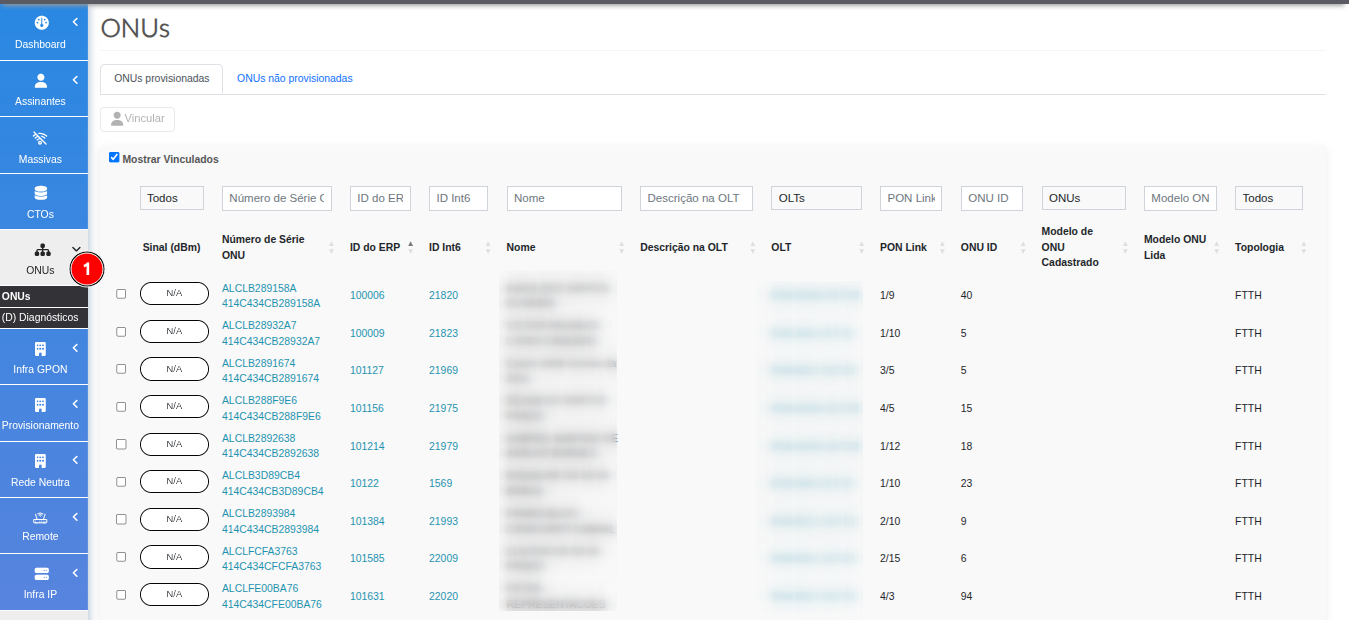
- In the left side menu, access:
ONUs
¶ 📑 Tab Structure
The screen is divided into two main tabs:
- Provisioned ONUs
- Unprovisioned ONUs
¶ ✅ Provisioned ONUs
This tab displays the ONUs that have already been provisioned in the system.
¶ 🔘 Filter: Show Linked
-
✔ Show Linked
- Displays only ONUs linked to a contract
-
❌ Unchecked
- Displays all provisioned ONUs
¶ 🔎 Available Filters
It is possible to apply several filters to refine the search:
| Category | Filter |
|---|---|
| Equipment Status | OK, Warning, Critical, Up, Loss, No Power, Massive Loss, Massive Power, Down, Inactive, No Information |
| Identification | Serial Number, ERP ID, ID 26 |
| Network | OLT, PON Link, ONU ID |
| Description | Name / Description on the OLT |
| Equipment | Registered ONU Model, Detected ONU Model |
| Topology | Topology |
¶ ⏳ Unprovisioned ONUs
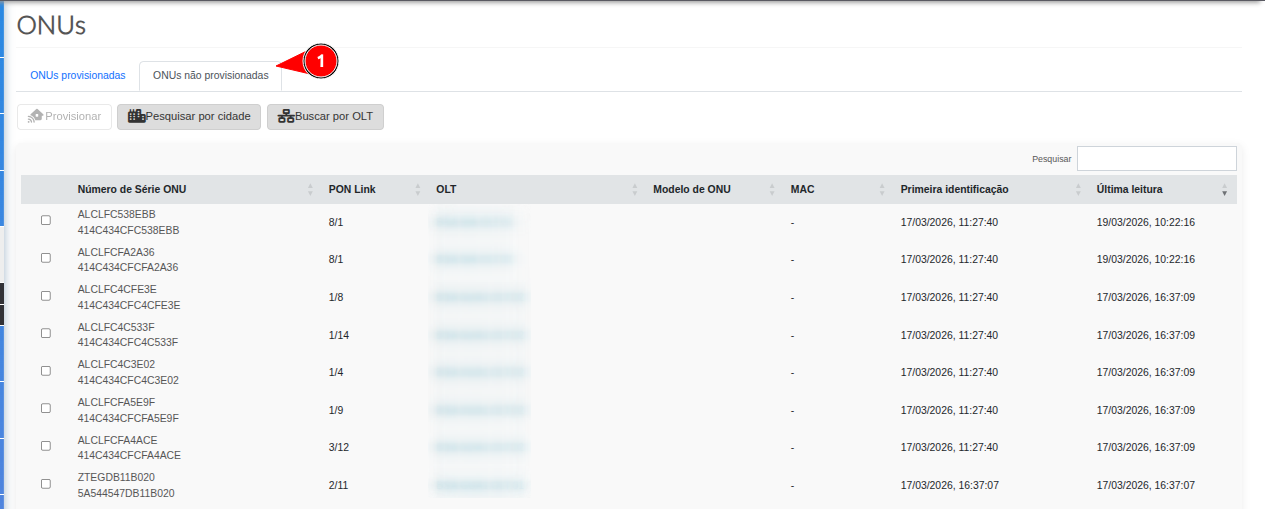
This tab displays ONUs that have not yet been provisioned, usually awaiting authorization.
¶ 🔍 Search Methods
¶ 🌆 Search by City
- Select a city
- The system evaluates all linked OLTs
- Displays ONUs pending authorization
¶ 🖧 Search by OLT
- Select a specific OLT
- Executes discovery
- Returns ONUs awaiting authentication
¶ 📊 Displayed Information
The results present the following data:
| Field | Description |
|---|---|
| Serial Number | ONU serial |
| PON Link | PON awaiting authentication |
| OLT | Source OLT |
| Model | ONU model (when available) |
| MAC | MAC address |
| First Identification | Date of first detection |
| Last Reading | Last update |
¶ 🔎 Quick Search
- Search field to locate specific ONUs
- Allows searching by:
- Serial
- MAC
- Any displayed information
¶ ⚙️ Provision ONU
- Select an ONU
- The Provision button will be enabled
- Allows provisioning directly from the screen
¶ 🧭 Provisioning Flow
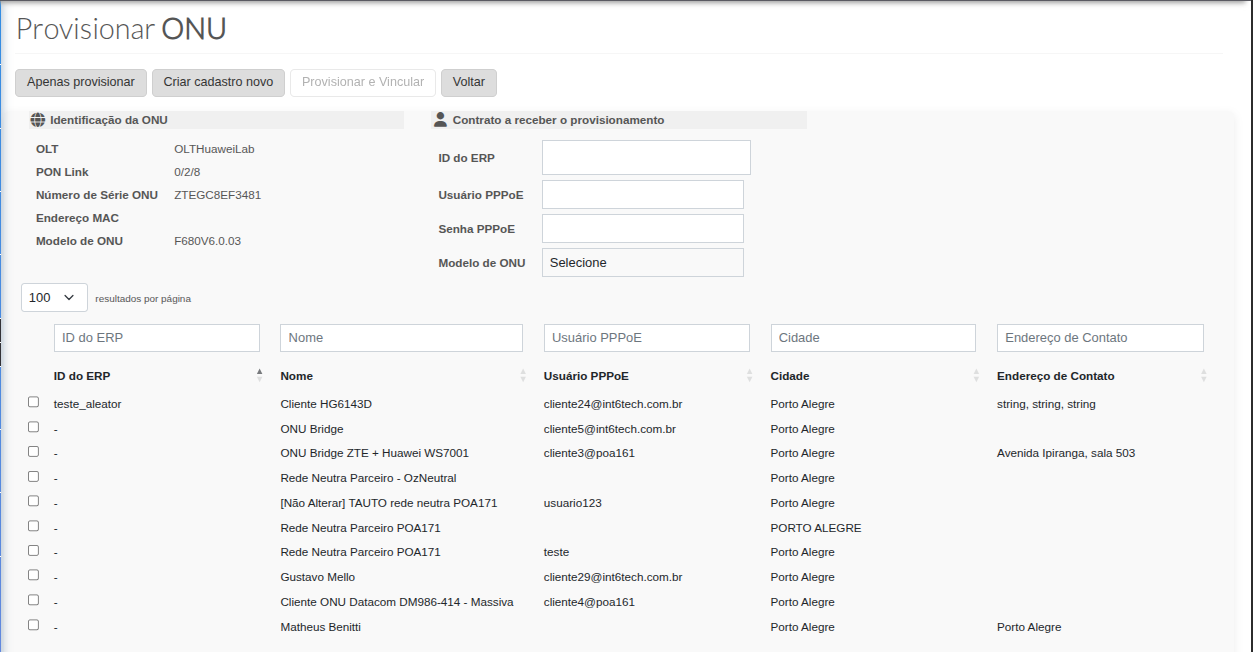
When selecting the ONU and clicking Provision, the system redirects to the Provision ONU screen.
¶ ⚙️ Available Options
On this screen it is possible to:
- ✔ Only Provision the equipment
- ✔ Create a new customer record
- ✔ Provision and link to an existing record
- ✔ Return to the previous screen
¶ 📡 ONU Information
On the left side, the ONU information is displayed:
- OLT where it will be authenticated
- PON Link
- Serial Number
- MAC (when available)
- ONU Model (when identified)
¶ 👤 Contract Information
On the right side, the contract information that will receive the provisioning is displayed.
¶ 📋 List of Available Contracts
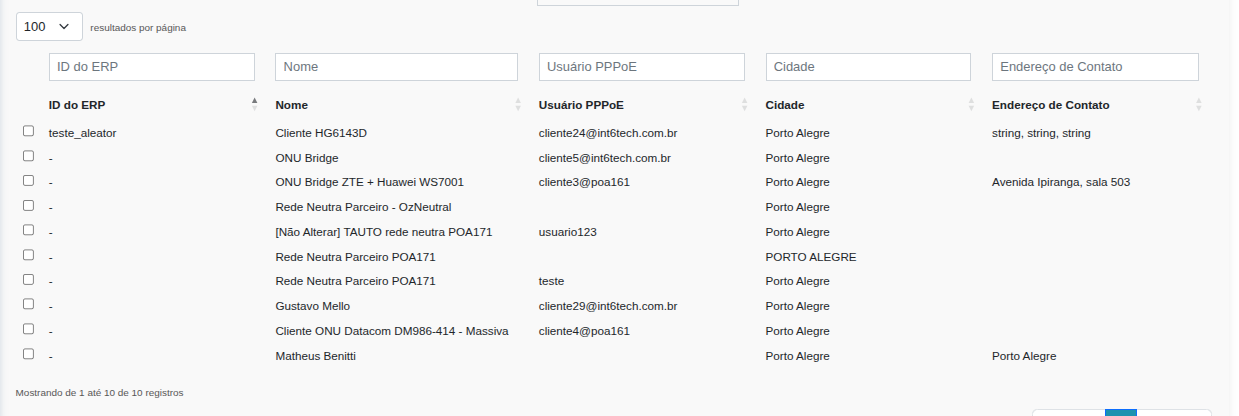
Below, a list of contracts without linked equipment is displayed, which can receive the ONU.
¶ 🔎 Search Filters
It is possible to locate contracts through:
- ERP ID
- Customer name
- PPPoE username
- City
- Contract address
¶ ✅ Contract Selection
- Select the desired contract by checking the corresponding checkbox
- After selection:
- ERP ID will be automatically filled in the field contract to receive provisioning
- PPPoE username will be automatically filled in the field contract to receive provisioning
¶ 📦 ONU Model Selection
- It is necessary to inform the ONU Model
- When clicking on the field:
- A list with available models will be displayed
¶ 🚀 Finish Provisioning
- After selecting the contract and the ONU model:
- Click on Provision and Link
✔ Result:
- ONU will be authorized on the OLT
- ONU will be linked to the selected contract
¶ 🎯 Flow Summary
- Select ONU
- Click on Provision
- Choose contract
- Define ONU model
- Confirm provisioning