¶ 📦 Imported Resources
The Imported Resources tab provides a consolidated view of the active equipment on the OLT and the relationship between these resources and the existing contracts in the Portal.
¶ 🖼️ Overview
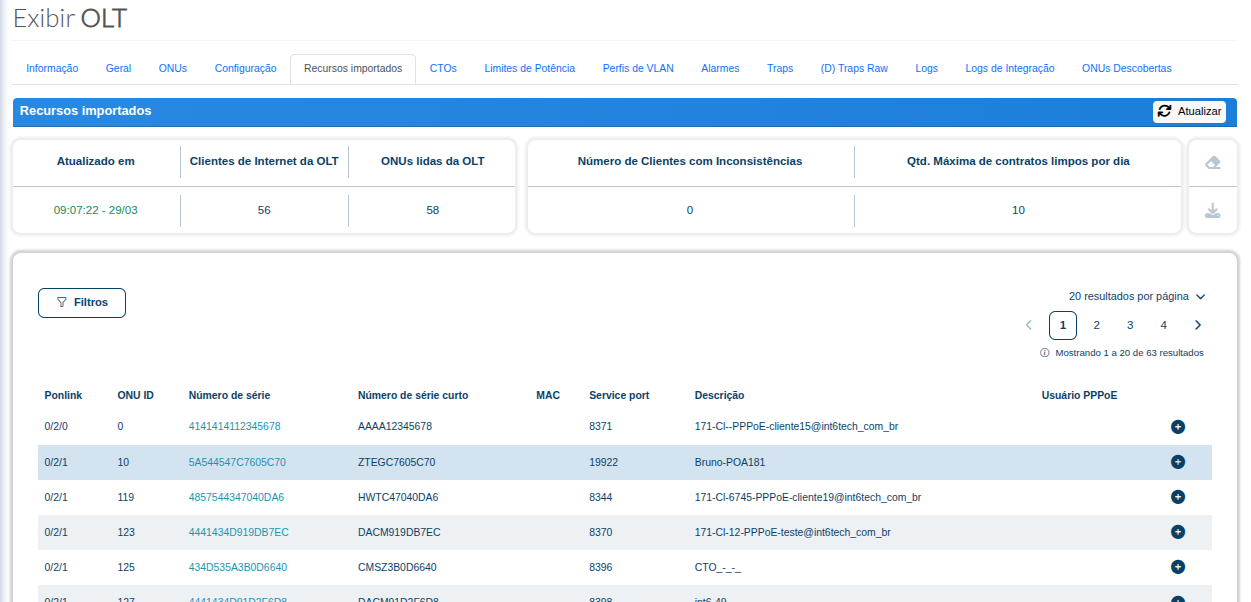
¶ 📌 Screen Purpose
This feature allows you to view the equipment identified on the OLT, including information such as:
- Ponlink
- ONU ID
- Serial Number
- Short Serial Number
- MAC
- Service Port
- Description
- PPPoE User
It is mainly used to help verify equipment provisioned on the OLT and confirm whether it is associated with contracts in the Portal.
¶ 🔄 Update Button
The Update button allows you to force a new read of the OLT resources.
When this button is clicked, the system performs a new query on the OLT to import or update information about the provisioned equipment.
This action is useful when a recent change has been made directly on the OLT and the information needs to be reflected in the Portal.
¶ 📊 Summary Cards
| Field | Description |
|---|---|
| Updated At | Displays the date and time of the last imported resources update. |
| OLT Internet Clients | Number of Internet clients identified on the OLT. |
| ONUs Read from the OLT | Number of ONUs found during the OLT reading process. |
| Number of Clients with Inconsistencies | Number of clients with potential discrepancies between the Portal, OLT, or imported data. |
| Maximum Number of Contracts Cleaned per Day | Configured daily limit for the automatic cleanup of inconsistent contracts. |
¶ 🔎 Filters
The Filters button allows you to refine the search for imported resources.
The filters can be used to locate a specific device, validate information for a particular PON, or search for customer-related data.
¶ 📋 Imported Resources Table
The table lists the equipment found on the OLT and its main technical information.
| Column | Description |
|---|---|
| Ponlink | Identifies the PON position where the ONU is provisioned. |
| ONU ID | ONU ID within the PON on the OLT. |
| Serial Number | Complete serial number of the ONU. |
| Short Serial Number | Short serial number used for simplified device identification. |
| MAC | MAC address identified for the resource, when available. |
| Service Port | Service Port associated with the client on the OLT. |
| Description | Description configured or identified on the OLT for the resource. |
| PPPoE User | PPPoE user associated with the contract, when a relationship is identified. |
¶ ➕ Resource Details
At the side of each row, there is an expansion button (+) that allows you to view additional details about the imported resource.
This feature helps with the individual analysis of each ONU imported from the OLT.
¶ ⚠️ Points of Attention
⚠️ If the resource is present on the OLT but is not associated with a contract in the Portal, it may be necessary to validate integration data, PPPoE information, serial number, or data received from the ERP.
⚠️ Equipment provisioned directly on the OLT may appear on this screen after the imported resources are updated.
¶ ✅ When Should This Screen Be Used?
This screen should be used when you need to:
- Check the active equipment on the OLT;
- Verify whether an ONU was imported correctly;
- Identify equipment provisioned outside the Portal's standard workflow;
- Compare OLT data with existing contracts;
- Support the analysis of inconsistencies between the OLT, Portal, and ERP;
- Check the serial number, ONU ID, Ponlink, and Service Port of a device.