¶ 🖧 New OLT Registration
Registering an OLT (Optical Line Terminal) allows integrating the equipment into the Portal for management, provisioning, and monitoring.
To start, access:
Network Infrastructure → OLTs → + Register New OLT
¶ 🖼️ Registration Screen
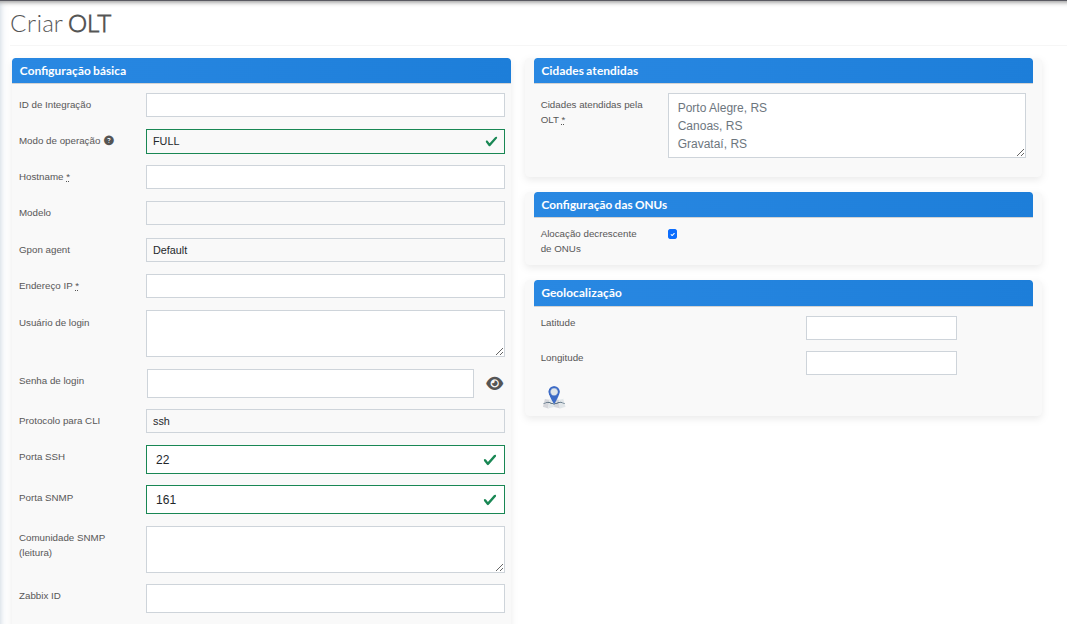
¶ ⚙️ 1️⃣ Basic Configuration
After clicking on Register New OLT, you must fill in the information in the Basic Configuration section:
| Field | Description |
|---|---|
| Integration ID | Fill in if there is an external integration linked. |
| Operation mode |
Defines how the Portal will interact with the OLT. FULL: Int6 performs provisioning and keeps automated monitoring routines active. MONITORING: Provisioning is performed by the provider, keeping only monitoring routines active. STANDBY: Provisioning is performed by the provider, with monitoring routines disabled. DEACTIVATED: OLT not in use, all routines disabled and database information is deleted. |
| Hostname | OLT identifier name in the system. |
| Model | Select the OLT model from the available options. |
| Pon Agent | Keep as Default. |
| IP Address | IP address to access the OLT. |
| Login Username | Administrative access username. |
| Login Password | Password corresponding to the provided username. |
| CLI Protocol | Define whether access will be via SSH or Telnet. |
| Telnet Port | Port used for Telnet connection (example: 23). |
| SNMP Port | Port used for SNMP communication (example: 161). |
| SNMP Community (read) | SNMP community configured for read-only access. |
| Zabbix ID | Equipment identifier in Zabbix, if monitoring exists. |
¶ 🌎 2️⃣ Served Cities
In this section, the cities served by this OLT must be informed.
Cities must be listed along with their respective state.
📌 Filling example:
- Porto Alegre, RS
- Canoas, RS
- Gravataí, RS
¶ 🔢 3️⃣ ONU Configuration
By default, the system starts with:
✔ Descending allocation of ONU IDs
This means that IDs will be distributed in descending order 128 --> 1 during provisioning.
¶ 📍 4️⃣ Geolocation
Optionally, it is possible to register:
- Latitude
- Longitude
This information corresponds to the POP where the OLT is installed, allowing geographic visualization in the system.
¶ ✅ Finalization
After filling in all required information:
- Review the entered data
- Confirm ports and credentials
- Click on Save / Register
The OLT will be available in the index for use and monitoring.