¶ 🔎 Discovered ONUs
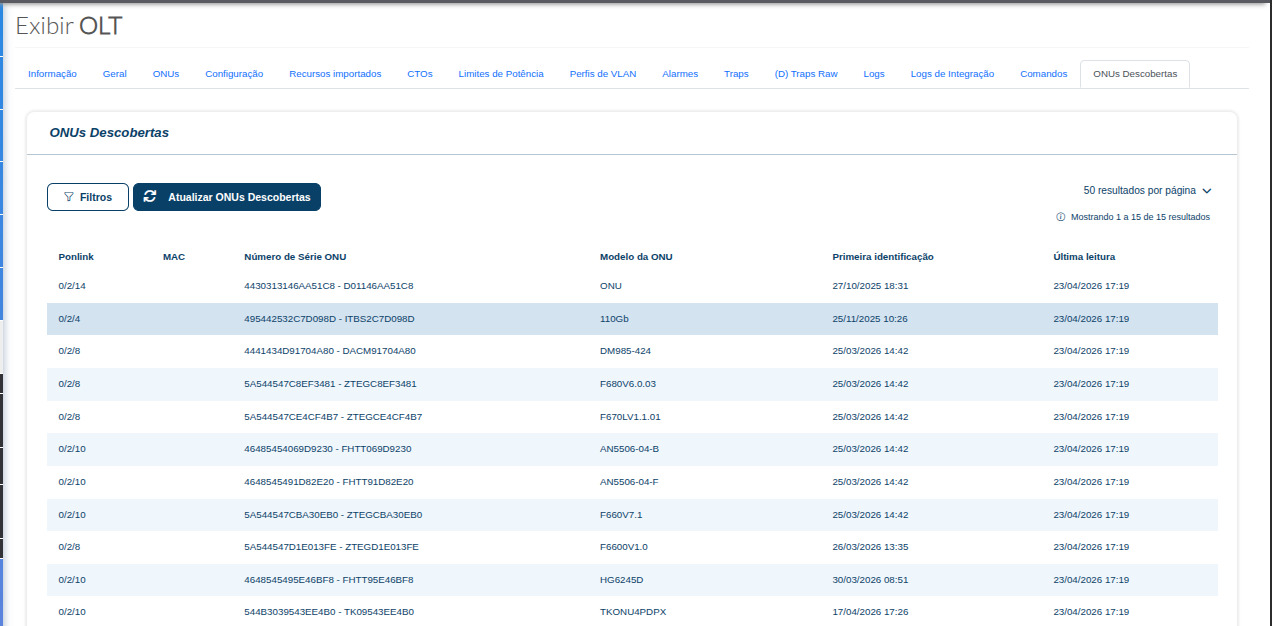
The Discovered ONUs tab displays devices that are pending authorization on the OLT.
This screen can be used when it is necessary to verify whether an ONU/ONT is already being detected by the OLT and is available to proceed with the provisioning process.
¶ 📌 Screen Purpose
Allows users to view devices discovered by the OLT, making it easier to identify ONUs that have not yet been provisioned or authorized in the portal.
¶ 🔍 Filters
The Filters button allows you to refine the search for discovered ONUs, making the query more specific according to operational or support needs.
¶ 🔄 Update Discovered ONUs
When clicking Update Discovered ONUs, the portal performs a new discovery query on the OLT to search for devices that are pending authorization.
This feature is useful when a technician reports that an ONU has been connected in the field and the support agent needs to verify whether it is already being detected by the OLT.
¶ 🧾 Displayed Information
| Field | Description |
|---|---|
| Ponlink | Indicates the slot/PON port where the ONU was detected. |
| MAC | MAC address or related identifier of the discovered device. |
| ONU Serial Number | Serial number of the ONU/ONT identified by the OLT. |
| ONU Model | Model returned by the OLT during device identification. |
| First Detected | Date and time when the ONU was first detected. |
| Last Read | Date and time of the most recent update/read performed on the OLT. |
¶ ✅ Usage Example
If a support agent needs to verify whether an ONU is available for provisioning, they can access:
PON Infrastructure → OLTs → Select OLT → Discovered ONUs
Then, they can use the Filters to locate the desired device or click Update Discovered ONUs to perform a new search on the OLT.