¶ 🚨 OLT Alarms
The OLT Alarms tab allows you to monitor events and alerts generated directly by the equipment, making it possible to identify optical failures, ONU outages, signal loss, power failures, and other occurrences detected by the OLT.
This feature is mainly used by:
- NOC teams
- Technical support
- Deployment teams
- Engineering
- Network monitoring teams
Through this screen, you can view alarms in real time, identify recurring events, and assist in diagnosing issues within the PON network.
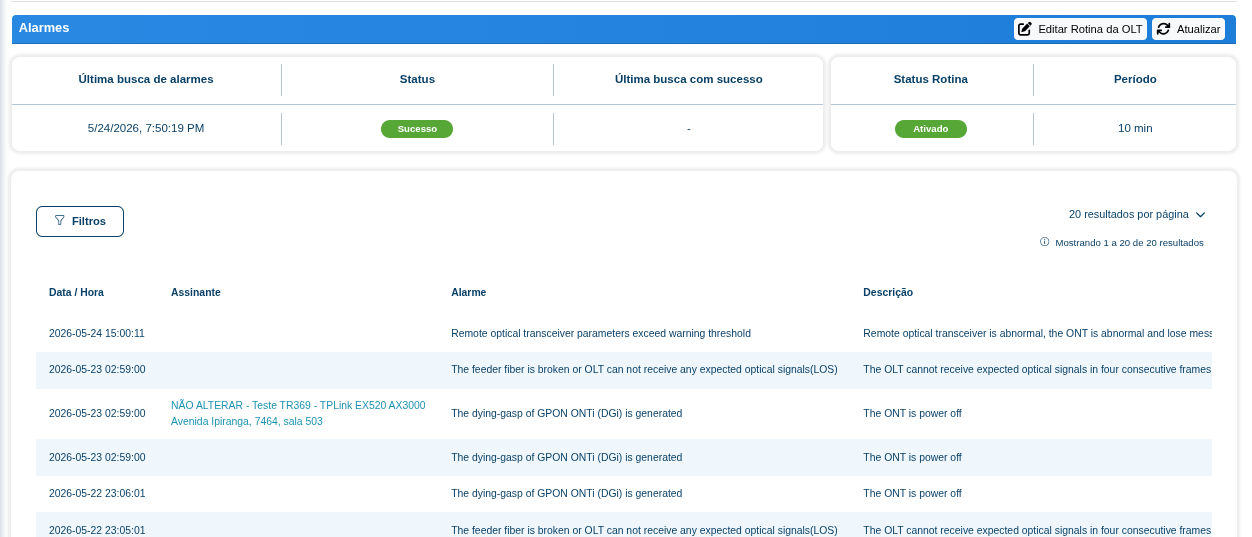
¶ 📊 Alarm Routine Information
At the top of the screen, information related to the automatic routine responsible for collecting alarms from the OLT is displayed.
| Field | Description |
|---|---|
| Last Alarm Search | Date and time of the last alarm collection routine execution. |
| Status | Result of the last routine execution. |
| Last Successful Search | The last time the alarm collection was completed successfully. |
| Routine Status | Indicates whether the automatic routine is active. |
| Interval | Configured interval for running the alarm collection routine. |
¶ 🔄 Routine Update
In the upper-right corner of the screen, there are actions related to the OLT alarm routine.
| Button | Function |
|---|---|
| Edit OLT Routine | Allows you to change the alarm collection routine settings. |
| Update | Manually performs a new alarm search on the OLT. |
¶ 📋 Alarm Table
The main table displays all alarms collected from the OLT.
Each row represents an event detected on the equipment or on an associated ONU.
| Column | Description |
|---|---|
| Date / Time | Date and time when the alarm occurred. |
| Subscriber | Customer associated with the event, when identified. |
| Alarm | Technical name of the event returned by the OLT. |
| Description | Detailed description of the alarm. |
¶ 🔍 Filters
The screen includes a filter button to make it easier to find specific events.
Using the filters, you can search alarms by:
- Date
- Customer
- Alarm type
- Specific events
- Period
- ONU occurrences
¶ ⚠️ Examples of Common Alarms
Below are some examples of alarms frequently found on PON OLTs.
| Alarm | Meaning |
|---|---|
| LOS (Loss of Signal) | Loss of optical signal between the ONU and the OLT. |
| DGi (Dying Gasp) | Indicates that the ONU was powered off or lost electrical power. |
| Optical Threshold Exceeded | Optical power is outside the expected thresholds. |
| ONU Offline | The ONU has lost communication with the OLT. |
¶ 🧠 Operational Use
The alarms tab directly supports activities such as:
- Identifying optical fiber breaks
- Diagnosing offline customers
- Monitoring recurring failures
- Identifying power fluctuations
- Troubleshooting optical power issues
- Analyzing PON network stability
- Supporting NOC and technical support teams
¶ 💡 Notes
⚠️ The alarms displayed depend directly on communication with the OLT and on the model/manufacturer being used.
⚠️ Some manufacturers may use different descriptions for the same type of event.
⚠️ The collection routine must be active for alarms to be updated automatically.