¶ 🧭 OLT FOTBs
The FOTBs tab displays all Fiber Optical Termination Boxes (FOTBs) associated with the selected OLT, providing a consolidated view of the network's physical infrastructure linked to the mapping system.
¶ ⚙️ Prerequisites
For the FOTBs to be displayed correctly, the following requirements must be met:
- The OLT must have an integration ID corresponding to the mapping system
- The map integration must be configured as FOTB Sync
- The optimized API of the mapping system must be used
⚠️ If these requirements are not met, the FOTBs will not be displayed in this tab.
¶ 📍 Access
Menu:
GPON Infrastructure → OLTs → Select OLT → FOTBs Tab
¶ 🖼️ Screen Overview
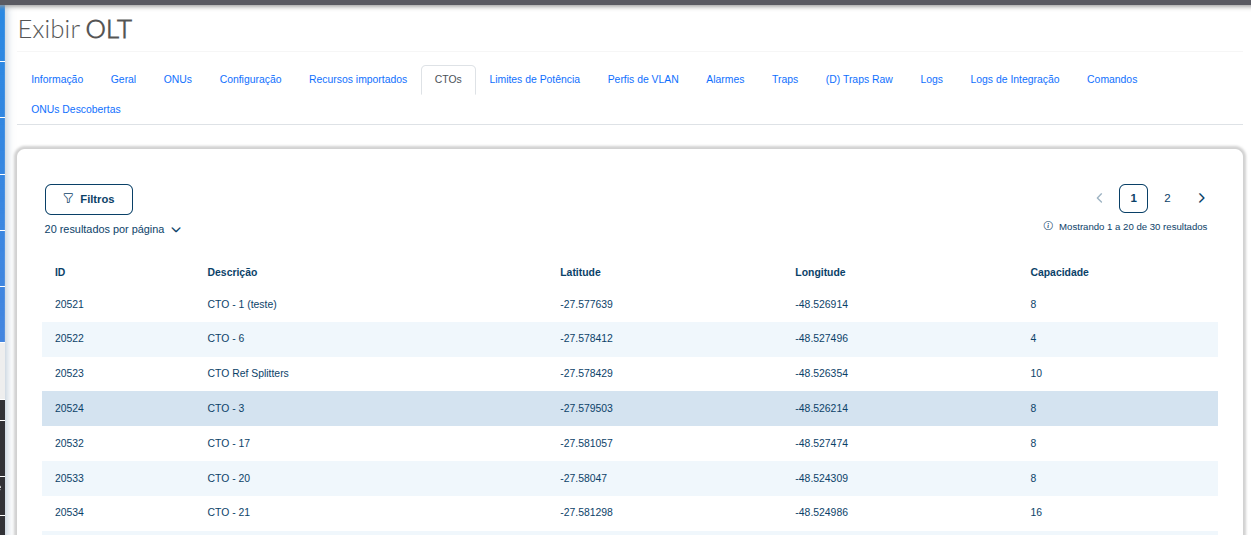
¶ 📊 Table Structure
The table displays the following information:
| ID | Description | Latitude | Longitude | Capacity |
|---|---|---|---|---|
| Unique identifier of the FOTB | Name or description of the FOTB in the system | Geographic coordinate (Latitude) | Geographic coordinate (Longitude) | Number of ports available on the FOTB |
¶ 🔎 Filters and Pagination
- Filters: Allows you to refine the search for displayed FOTBs
- Pagination: Controls navigation between result pages
- Results per page: Allows you to adjust the number of records displayed
¶ 💡 Important Notes
- The displayed FOTBs come from the integrated mapping system
- Changes must be made directly in the mapping system
- The tab is read-only and does not allow direct editing
¶ 🧩 Use Cases
- Verify whether the FOTB is correctly associated with the OLT
- Check available capacity for new activations
- Identify the geographic location of the infrastructure
- Support field teams in identifying service points