¶ 🔄 Integration Logs Tab
The Integration Logs tab allows you to view all integrations performed between the INT6 Portal and external systems, such as ERPs, mapping platforms, and integrated APIs.
This feature is mainly used for auditing, troubleshooting, and validating communications performed by the system.
¶ 🧭 Screen Overview
The main screen displays the integration executions performed by the Portal.
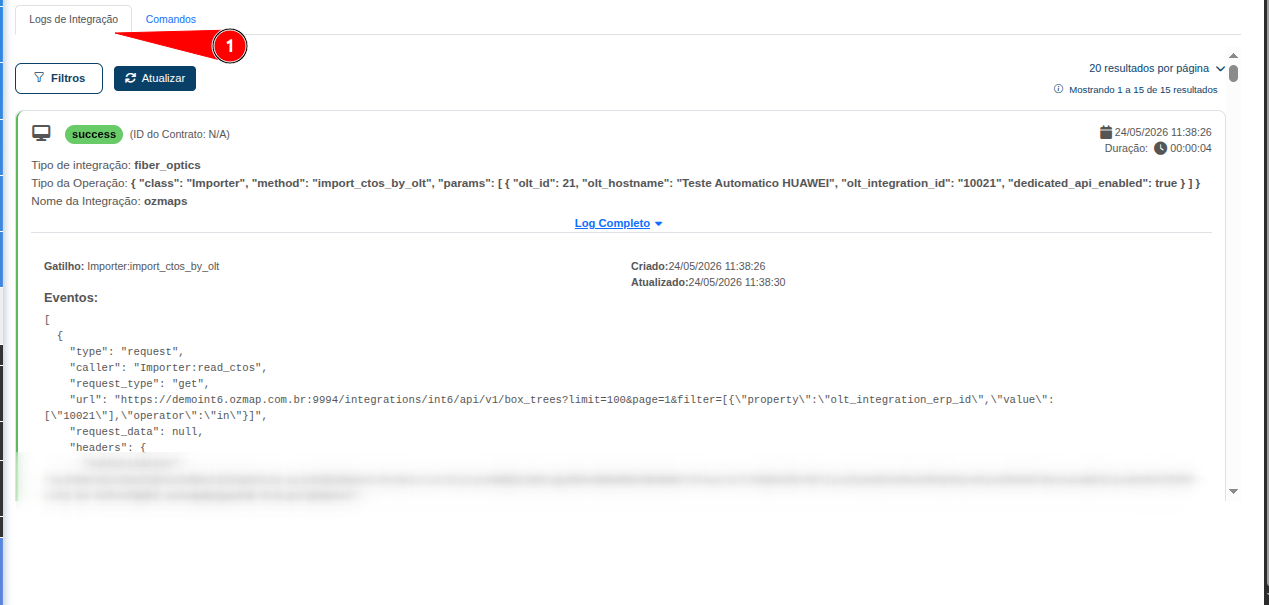
On this screen, you can view:
- Integration status.
- Related contract ID.
- Type of integration executed.
- Method/operation used.
- Integration name.
- Date and time of execution.
- Integration duration.
- Processed events.
- Full Log button to expand the technical details.
¶ 🔎 Full Log
When expanding the Full Log, the system displays all technical information related to the executed integration.
The information may include:
- Trigger responsible for the execution.
- Executed method.
- URL of the API called.
- Payload sent.
- Headers used.
- Data returned by the API.
- Internal integration events.
- Creation and update dates.
- Authentication and processing information.
¶ 🧩 Example Scenario from the Image
In the example shown in the image:
- Integration type:
fiber_optics - Executed operation:
import_ctos_by_olt - Integration used:
ozmaps
The purpose of the routine is to:
- Import the FOTBs associated with the specified OLT.
- Retrieve information directly from the mapping platform API.
- Process the received data and update the Portal.
The log displays the complete JSON structure of the executed integration, allowing you to validate:
- Which endpoint was called.
- Which parameters were sent.
- What response was received.
- How the internal processing was performed.
¶ ✅ Purpose of the Integration Logs Tab
This tab is widely used to:
- Validate integrations between the Portal and ERP systems.
- Validate integrations with mapping platforms.
- Investigate synchronization failures.
- Review payloads sent to external APIs.
- Audit integrations executed by the system.
- Validate responses received from third-party APIs.
- Support advanced technical troubleshooting.
¶ ⚠️ Notes
-
Some integrations may contain a large amount of information in the log.
-
The logs directly assist technical, support, and deployment teams in identifying communication failures between systems.
ℹ️ The Integration Logs tab is an essential tool for technically monitoring INT6 Portal integrations, allowing you to trace all communications performed with external systems.