¶ 🧭 ONUs Tab
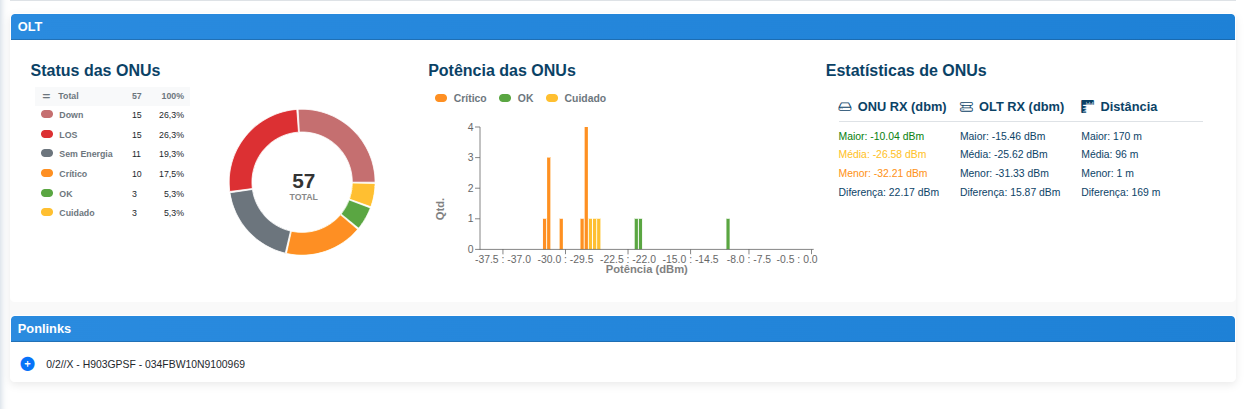
This tab presents a consolidated summary of the ONUs linked to the selected OLT, allowing quick monitoring of the operational status, optical power levels, and general reception and distance statistics.
¶ 🎯 Tab Purpose
The ONUs tab was created to provide a quick view of the health of authenticated equipment on the OLT, supporting operational analysis and identifying possible signal deviations, alarms, and equipment distribution by status.
¶ 🖼️ Screen Overview
¶ 📌 What is displayed in this tab
The screen is divided into information blocks that help interpret the behavior of the ONUs registered on that OLT.
¶ 1️⃣ ONU Status
This block displays the summary by status of the OLT ONUs.
The presented statuses indicate the current condition of the monitored equipment, such as:
- Total: total number of ONUs considered in the summary.
- Down: ONUs without communication or out of operation.
- LOS: ONUs with optical signal loss.
- No Power: ONUs without detected power supply.
- Critical: ONUs in a severe alert condition, usually associated with out-of-range power.
- OK: ONUs in normal operating condition.
- Warning: ONUs that require attention but are not yet classified as critical.
In addition to the listing, the system displays a donut chart, making it easier to visualize the proportion of each status relative to the total.
¶ 2️⃣ ONU Power
This block displays a distribution chart of ONU optical power, allowing visual identification of signal level concentration.
The power levels are grouped into ranges and classified into categories such as:
- Critical
- OK
- Warning
This chart helps in understanding the overall behavior of the OLT ONUs and identifying scenarios with higher concentration of signals outside the expected standard.
¶ 3️⃣ ONU Statistics
This block presents summarized metrics about the values collected from the ONUs.
The displayed information is organized into columns, typically including:
-
ONU RX (dBm)
Displays the optical reception values of the ONUs, including:- highest value
- average
- lowest value
- difference between highest and lowest
-
OLT RX (dBm)
Displays values related to the OLT reception in relation to the ONUs, also including:- highest value
- average
- lowest value
- difference
-
Distance
Shows the behavior of ONU distances relative to the OLT, including:- longest distance
- average
- shortest distance
- difference between extremes
These statistics help identify relevant variations among the equipment linked to the selected device.
¶ 4️⃣ Ponlinks
At the bottom of the tab, the Ponlinks section is displayed.
Here, the OLT PON links can be expanded for details, allowing visualization of the ONUs associated with each optical path.
This grouping facilitates navigation and segmented analysis by OLT port/PON.
¶ ✅ When to use this tab
The ONUs tab is especially useful for:
- validating the overall condition of the ONUs of an OLT;
- quickly identifying ONUs with failures or alerts;
- analyzing optical power distribution;
- checking summarized signal and distance statistics;
- navigating through Ponlinks for equipment details.
¶ ⚠️ Important Notes
- The numbers displayed on the screen represent an operational summary of the ONUs linked to the selected OLT.
- The interpretation of statuses and power levels must consider the operational scenario and the criteria defined by the environment.
- For more detailed analysis per equipment, additional query and diagnostic features available in the portal should be used.