¶ ⚡ OLT Power Limit
¶ 🧭 Overview
The Power Limit tab allows you to configure the minimum acceptable optical signal levels for ONU provisioning.
This configuration can be applied in two ways:
- 🌐 Global (Entire OLT) → Defines a default threshold for the entire OLT
- 🔌 Specific (Chassis / Slot / Port - PON) → Defines specific thresholds for each port
If the power level is outside the configured threshold, the system automatically blocks provisioning, helping ensure installation quality.
¶ 🖥️ Configuration Screen
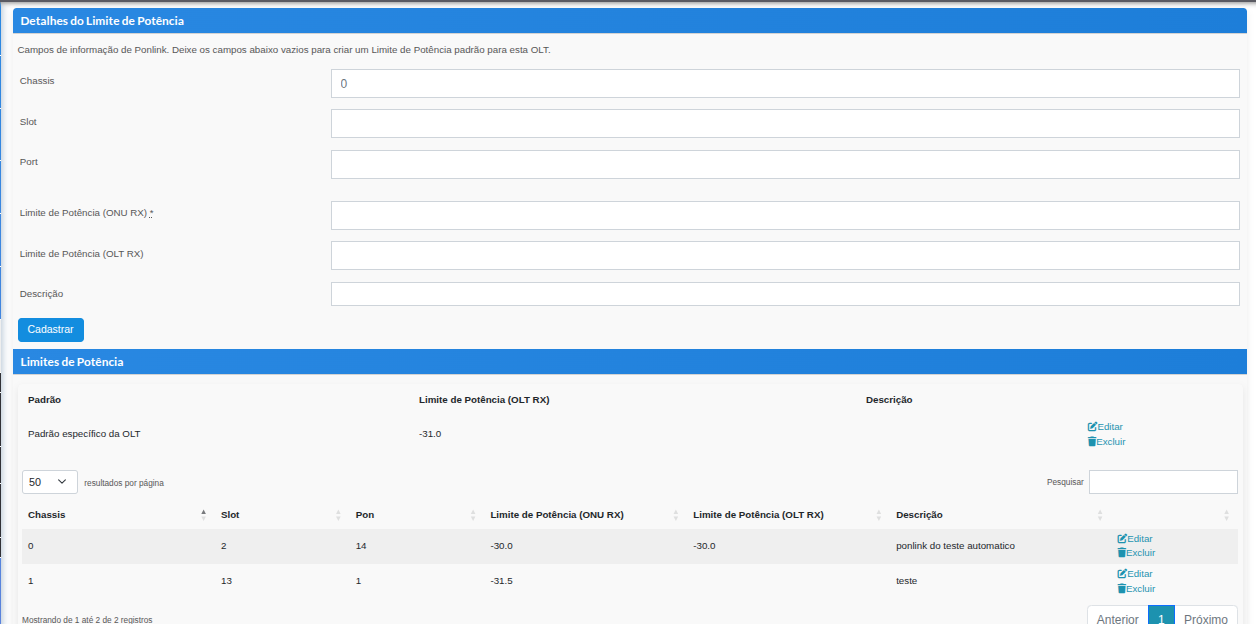
¶ ⚙️ Configuration Fields
| Field | Description |
|---|---|
| Chassis | OLT chassis identifier (when applicable) |
| Slot | GPON board slot |
| Port | OLT PON port |
| Power Limit (ONU RX) | Minimum power level received by the ONU |
| Power Limit (OLT RX) | Minimum power level received by the OLT |
| Description | Free-text field used to identify the configuration |
¶ 📊 Configuration Types
¶ 🌐 OLT Default
- No blocking occurs when no value is specified
- Used as a fallback for all ports
¶ 🔌 Per-PON Configuration (Chassis / Slot / Port)
- Provides greater control for each port
- Ideal for scenarios with variations in distance or network quality
¶ 🚨 Provisioning Validation Rule
During the provisioning process:
- 📡 The system validates the ONU and OLT power levels
- ❌ If the signal is outside the configured threshold, the process is interrupted
- ⚠️ The technician should:
- Check connectors
- Clean the fiber
- Review splices
- Validate link attenuation
✔️ Provisioning can continue only after the signal is within the configured threshold
¶ 💡 Best Practices
- Define a safe global threshold to prevent activations with poor signal levels
- Use per-PON configurations for specific scenarios
- Frequently monitor ONU RX levels
- Adjust thresholds according to the provider's operational standards
¶ 📌 Practical Example
Scenario:
An ONU has an RX level of -26 dBm, while the configured limit is -25 dBm.
An ONU has an RX level of -26 dBm, while the configured limit is -25 dBm.
Result:
❌ Provisioning blocked
✔️ The technician must adjust the signal before continuing