¶ 📡 OLT Alarms via TRAP
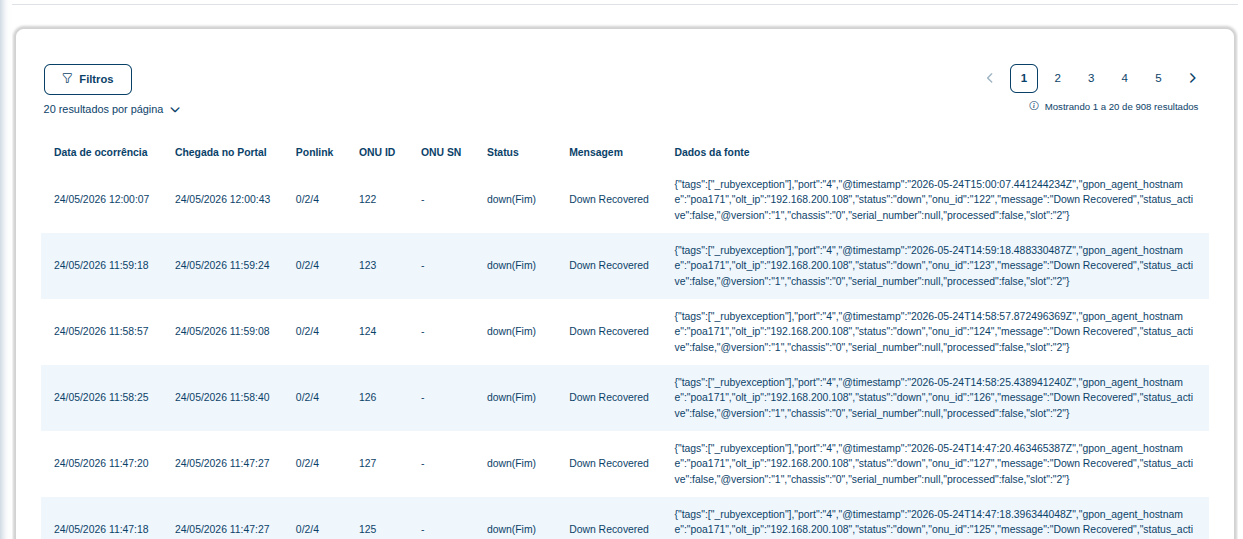
The Alarms via TRAP tab displays events received in real time through SNMP Traps sent by the OLT.
Unlike periodic alarm collection, in this mode the OLT automatically sends events to the Portal as soon as an occurrence is detected.
This feature enables faster fault detection and more efficient PON network monitoring.
¶ 🧠 What Are TRAPs?
A TRAP is an SNMP protocol mechanism in which network equipment automatically sends notifications to a monitoring server.
In a PON environment, the OLT can send events such as:
- ONU offline
- ONU online
- Optical signal loss
- Dying Gasp
- ONU recovery
- PON port failures
- Optical signal fluctuations
- Critical hardware alarms
Without the need to wait for a polling routine.
¶ ⚙️ Prerequisites
To use this feature, the following requirements must be met:
- OLT with SNMP TRAP support
- TRAP destination correctly configured on the OLT
- Communication allowed between the OLT and the Portal
- SNMP community configured
- SNMP/TRAP port allowed on the network
⚠️ Behavior and transmitted events may vary depending on the OLT manufacturer.
¶ 📋 TRAP Alarm Table
The table displays events received directly from the OLT.
Each row represents an event sent by the equipment in real time.
| Column | Description |
|---|---|
| Occurrence Date | Date and time when the event occurred on the OLT. |
| Received by Portal | Date and time when the Portal received the TRAP. |
| Ponlink | Identifies the PON where the event occurred. |
| ONU ID | Logical ONU ID within the PON. |
| ONU SN | ONU serial number, when identified. |
| Status | Status of the received event. |
| Message | Brief description of the event. |
| Source Data | Raw payload received via TRAP containing technical information about the event. |
¶ 🔎 Filters
The screen includes filters to make it easier to locate specific events.
The filters can be used to:
- Search alarms by period
- Filter by ONU ID
- Locate events from a specific PON
- Search for specific messages
- Identify recurring alarms
- Validate events by status
¶ ⚠️ Examples of Received Events
| Event | Description |
|---|---|
| Down Recovered | The ONU resumed communication after an outage. |
| Dying Gasp | The ONU lost power or was powered off. |
| LOS | Optical signal loss was detected. |
| ONU Offline | The ONU lost communication with the OLT. |
| ONU Online | The ONU returned to an operational state. |
¶ 🚀 Benefits of TRAP Monitoring
Using TRAPs provides:
- Real-time event reception
- Reduced fault detection time
- Less reliance on periodic polling
- Greater NOC operational efficiency
- Proactive PON network monitoring
- Faster identification of mass outages
¶ 🧩 Technical Event Data
The Source Data column displays the complete technical payload received from the OLT.
Depending on the manufacturer, the following information may be displayed:
- OLT hostname
- OLT IP address
- Slot/PON
- ONU ID
- Event timestamp
- Alarm type
- Internal tags
- Processed status
- Serial Number
- Chassis
- Processing information
¶ 💡 Notes
⚠️ For events to appear on this screen, the OLT must be configured to send TRAPs.
⚠️ Some manufacturers use different payload formats and alarm naming conventions.
⚠️ The displayed time depends on the time synchronization of both the OLT and the server.
⚠️ In network instability scenarios, there may be a delay between the event occurrence and its arrival at the Portal.