¶ ACS - Provisioning Scripts
The ACS Provisioning Scripts feature allows the provider to customize the commands sent to the ONT/ONU, via Auto-Configuration Server(ACS). Using TR-069 Protocol.
¶ Required Permissions
To access the page and view Scripts, the user must have the Acs Scripts (Read) permission, and for editing, the Acs Scripts (Write) permission.
¶ How to Access
Assuming the user has the required permissions, the ACS Scripts screen can be accessed through the side menu under Provisioning -> ACS - Provisioning Scripts.
¶ Table Fields
The main Provisioning Scripts page contains a table displaying the Scripts created in the Portal. The meaning of each column is described below:
- Title: Script name
- OUI: unique number assigned to hardware manufacturers by the IEEE
- Manufacturer: Indicates the manufacturer of the CPE
- ProductClass: Indicates the model of the CPE
- HardwareVersion: Indicates the Hardware Version of the CPE
- SoftwareVersion: Indicates the Software Version of the CPE
- Data Model: Indicates the TR-069's version the CPE is using
¶ Creating Scripts
Creating ACS - Provisioning Scripts requires knowledge of the Data Model of each CPE for which customization is required. Therefore ACS - Script development should only be enabled for experienced personnel.
Executing incorrect commands may result in service outages.
¶ Steps/Options
Users can configure, instantiate, or remove any supported data model path, subject to predefined schema constraints.
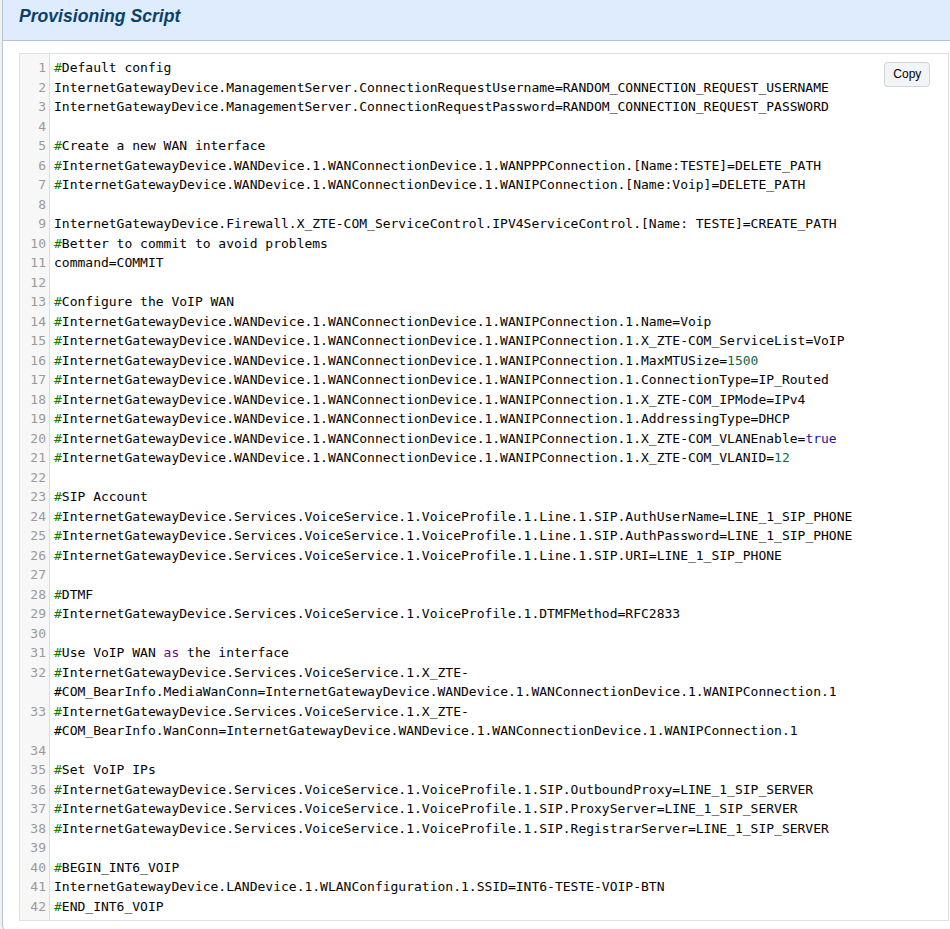
An example provisioning script for the ZTE F6600 is provided below:
¶ Device Initial Configuration Resolution
When provisioning, the system resolves the matching by querying the database using a most-specific to least-specific (fallback) precedence model based on the client’s hardware and firmware identifiers.
The resolution occurs in two phases:
- Primary Query Resolution (OUI Present): Evaluates matching rules starting with the highest parameter specificity down to the vendor OUI.
- Fallback Query Resolution (OUI Nil / Blank): If no matching record is found in Phase 1, the query repeats targeting records where
OUIisNULLor blank.
¶ Phase 1: Primary Precedence (OUI-Based)
The system attempts to match configuration records matching the client's OUI in descending order of specificity:
| Priority | Matching Fields |
|---|---|
| 1 | OUI + Manufacturer + Product Class + Router Model Name + Hardware Version + Software Version |
| 2 | OUI + Manufacturer + Product Class + Hardware Version + Software Version |
| 3 | OUI + Manufacturer + Product Class + Hardware Version |
| 4 | OUI + Manufacturer + Product Class |
| 5 | OUI + Manufacturer |
| 6 | OUI |
¶ Phase 2: Fallback Precedence (OUI is NULL or Blank)
If the primary query sequence yields no results, a secondary resolution cascade is executed where OUI is explicitly NULL or empty:
| Priority | Matching Fields |
|---|---|
| 1 | Manufacturer + Product Class + Router Model Name + Hardware Version + Software Version |
| 2 | Manufacturer + Product Class + Hardware Version + Software Version |
| 3 | Manufacturer + Product Class + Hardware Version |
| 4 | Manufacturer + Product Class |
| 5 | Manufacturer |
¶ Resolution Behavior
- First Match Wins: The evaluation halts immediately upon finding the first valid matching record.
- No Match Found: If both Phase 1 and Phase 2 cascades return no records, the client will fall back to system default provisioning rules or flag an unconfigured device error.
¶ Variables
When developing TR-069 provisioning scripts, variables and special commands can be inserted. During execution, these variables are dynamically replaced with values specific to the client or device installation.
The list of available parameters and commands is detailed below:
| Variable | Example | Notes |
|---|---|---|
| # or // | # Comment | Indicates a comment line. Ignored during execution. |
| "parameter=value" | "parameter=value" | Line with comments ignored |
| PPPOE_USERNAME | int6pppoe2@int6tech | Client's PPPoE WAN username |
| PPPOE_PASSWORD | senhaint6123 | Client's PPPoE WAN password |
| EFFECTIVE_VLAN | 2600 | Client's PPPoE WAN VLAN |
| EFFECTIVE_VOICE_VLAN | 2504 | Client's VoIP WAN VLAN |
| RANDOM_CONNECTION_REQUEST_USERNAME | u_9f82a1 | Generates a pseudo-random username for ACS connection request (required for remote access) |
| RANDOM_CONNECTION_REQUEST_PASSWORD | p_k7x90q | Generates a pseudo-random password for ACS connection request (required for remote access) |
| DEFAULT_INFORM_INTERVAL | 86400 | Client's Inform interval defined as an environment variable |
| CONDITIONAL_WIFI_SSID | teste_int6 | Wi-Fi SSID for newly installed clients; resolves to empty otherwise |
| CONDITIONAL_WIFI_PASSWORD | 12345678 | Wi-Fi password for newly installed clients; resolves to empty otherwise |
| CONDITIONAL_WIFI_5G_SSID | teste_int6_5G | 5G Wi-Fi SSID for newly installed clients; resolves to empty otherwise |
| CONDITIONAL_WIFI_5G_PASSWORD | 12345678 | 5G Wi-Fi password for newly installed clients; resolves to empty otherwise |
| WIFI_SSID | teste_int6 | Wi-Fi SSID, applied unconditionally |
| WIFI_PASSWORD | 12345678 | Wi-Fi password, applied unconditionally |
| WIFI_5G_SSID | teste_int6_5G | 5G Wi-Fi SSID, applied unconditionally |
| WIFI_5G_PASSWORD | 12345678 | 5G Wi-Fi password, applied unconditionally |
| LINE_1_SIP_USERNAME | 5135000000 | Line 1 SIP username |
| LINE_1_SIP_PASSWORD | as32rg | Line 1 SIP password |
| LINE_1_SIP_SERVER | 192.168.100.10 | Line 1 SIP server |
| LINE_1_SIP_PHONE | 5135000000 | Line 1 SIP phone number |
| LINE_2_SIP_USERNAME | 5130000000 | Line 2 SIP username |
| LINE_2_SIP_PASSWORD | 9ad123j | Line 2 SIP password |
| LINE_2_SIP_SERVER | 192.168.100.10 | Line 2 SIP server |
| LINE_2_SIP_PHONE | 5130000000 | Line 2 SIP phone number |
| COMMIT | command=COMMIT | GenieACS commit() function. Saves changes made to the device up to this point. Usage: command=COMMIT |
| DATE_NOW | 1725109200000 | Returns Date.now() timestamp collected during the Inform script execution |
| CREATE_PATH | path.to.create[]=CREATE_PATH | Inserts a new entry into an indexed parameter/path if possible. Usage: path.to.create[]=CREATE_PATH |
| DELETE_PATH | path.to.delete=DELETE_PATH | Deletes an entry from an indexed parameter/path if possible. Usage: path.to.delete=DELETE_PATH |
| SUGGESTED_AP_USERNAME | admin | Username defined by the portal for configuring device web management access |
| SUGGESTED_AP_PASSWORD | admin1234 | Password defined by the portal for configuring device web management access |