¶ 🧩 ACS Devices
The ACS Devices screen lists all equipment registered in the ACS (Auto Configuration Server) and allows viewing which ones are linked to an active contract in the Portal.
¶ 🔍 Filter — Show Linked
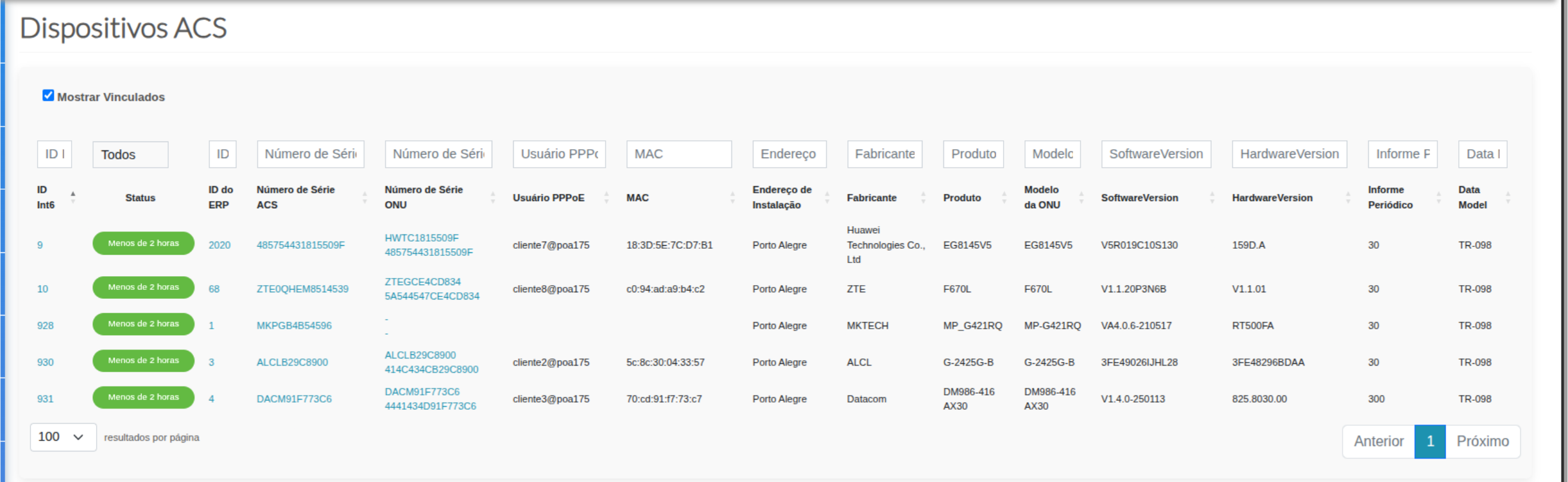
- When the ✅ Show Linked option is checked, the system displays only devices associated with existing contracts in the portal (active link).
- When unchecked, the system lists devices present in the ACS but not yet linked to any contract.
¶ 🧾 Table Structure
| Column | Description |
|---|---|
| 🆔 Int6 / ERP ID | Internal device identifier in the portal and ERP system. |
| 🔄 Status | Indicates the time since the last communication with the ACS (e.g., “Less than 2 hours”). |
| 🔢 ACS / ONU Serial Number | Shows the serial number registered in the ACS and the one detected on the ONU, allowing comparison and validation. |
| 👤 PPPoE Username | Identifies the PPPoE login used by the subscriber associated with the device. |
| 🔗 MAC Address | Physical (MAC) address of the ONU, used for authentication and access control. |
| 📍 Installation Address | Physical location where the equipment is installed. |
| 🏭 Manufacturer / Product / Model | Equipment identification details — manufacturer, product line, and ONU model. |
| ⚙️ Software / Hardware Version | Firmware and hardware versions reported by the ACS. |
| 📄 Periodic Inform | Configured interval for automatic report delivery to the ACS. |
| 🧮 Data Model | TR standard used in communication (e.g., TR-098, TR-181), defining the parameter structure. |
¶ 💡 Purpose
The ACS Devices screen is essential for monitoring and diagnosing registered equipment:
- Validates whether the device truly belongs to an active subscriber.
- Provides technical details (firmware, model, manufacturer) useful for updates or replacements.
¶ 📊 Tip
Use the search field or column filters (e.g., serial number, PPPoE, or manufacturer) to quickly locate specific devices.