¶ ⚙️ ACS Diagnostics
The ACS Self-Diagnostics feature allows remote testing of the subscriber's CPE to evaluate performance, connectivity, and stability.
The information is obtained through the ACS (TR-069/TR-181).
¶ 🧭 How to Access
- From the main menu, select ACS Diagnostics.
- Click Self-Diagnostics or select one of the available tests (Download, Upload, Ping, DNS, etc.).
- Monitor the status and results on the screen.
¶ 🧩 Self-Diagnostics Screen Structure
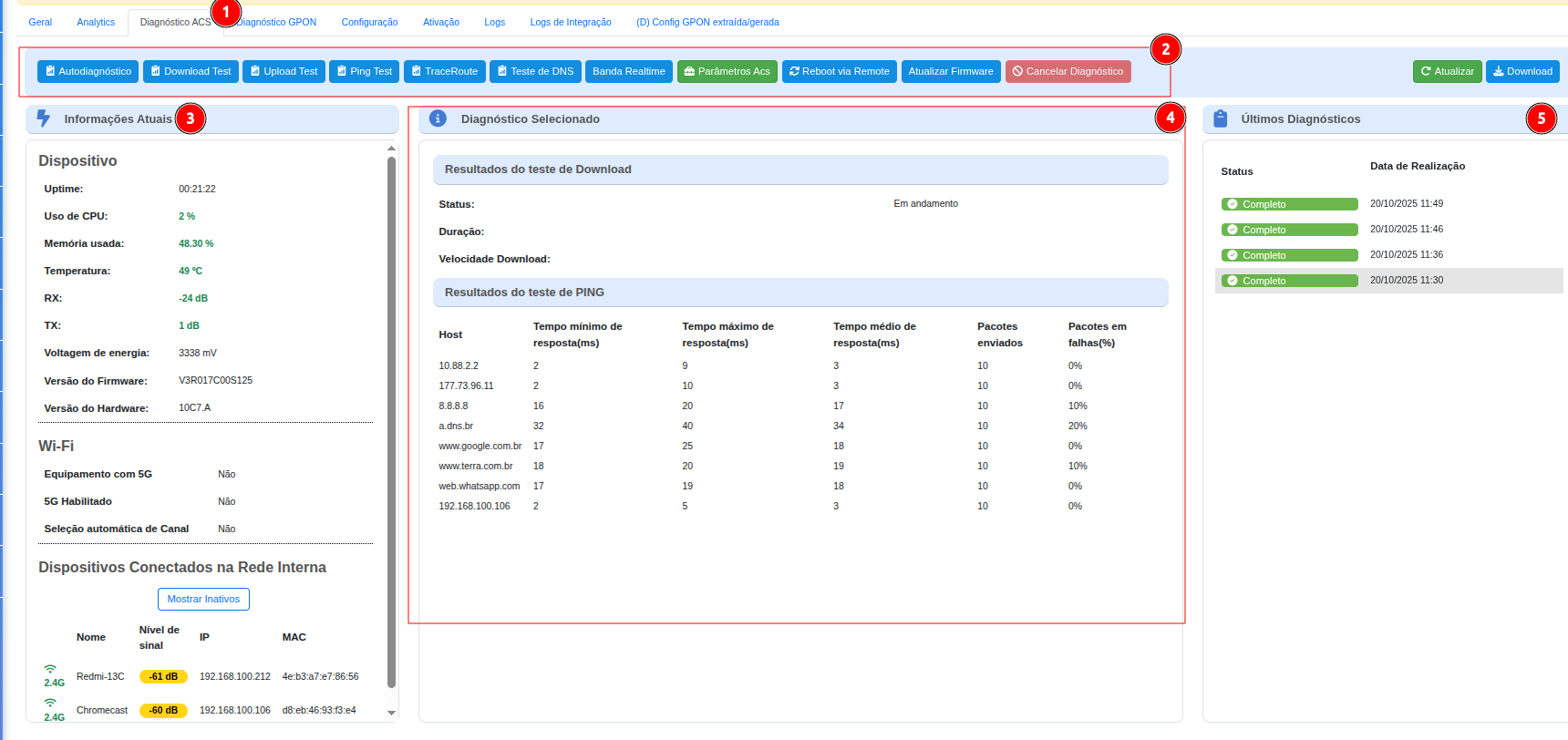
- 1️⃣ Diagnostics Menu — main tests and diagnostic tools.
- 2️⃣ Quick Actions Bar — refresh, download report, cancel.
- 3️⃣ Current Device Information — operational and Wi-Fi status.
- 4️⃣ Selected Diagnostic — detailed test results.
- 5️⃣ Recent Diagnostics — recent history for comparison.
¶ 1️⃣ Diagnostics Menu
Use the buttons to run tests individually or in sequence (Self-Diagnostics).
| Button | Function |
|---|---|
| Self-Diagnostics | Runs a sequence of tests (CPU, Ping, Download, Temperature, etc.). |
| Download / Upload Test | Measures the actual transfer rate and link stability. |
| Ping / TraceRoute / DNS Test | Checks latency, routing, and name resolution. |
| Realtime Bandwidth | Displays WAN usage in real time. |
| ACS Parameters / Remote Reboot | Retrieves or adjusts CPE parameters and allows remote reboot. |
| Remote Reboot | Allows the device to be restarted remotely. |
💡 Tip: run tests individually to isolate issues such as packet loss, DNS failures, routing problems, or throughput degradation.
¶ 2️⃣ Quick Actions Bar
Controls used to refresh data, export a report, and cancel a diagnostic currently in progress.
| Action | Description |
|---|---|
| Refresh | Forces immediate collection of CPE data. |
| Download | Exports the results as a report file. |
| Cancel Diagnostic | Stops the test currently in progress. |
¶ 3️⃣ Current Device Information
A side panel displaying real-time operational and Wi-Fi status:
- Uptime, CPU, Memory, Temperature.
- RX/TX (optical or radio, depending on the CPE) and Voltage.
- Installed Firmware / Hardware versions.
Wi-Fi
- Whether 5 GHz is available/enabled and whether automatic channel selection is active.
- Connected clients with signal level (dB), IP address, and MAC address.
¶ 4️⃣ Selected Diagnostic
The central area displays the results of the current test, whether it is still running or has been completed:
- Test status and duration.
- Download Test: speed and connection stability.
- Ping: minimum/average/maximum response times, packets sent, and failures (%).
📈 Helps identify high latency, packet loss, and route variations.
¶ 5️⃣ Recent Diagnostics
Historical data for time-based comparison and identification of recurring issues:
- Status (completed/failed) and execution date/time.
- Helps identify intermittent issues and critical time periods.
¶ 🧠 Quick Interpretation (Wi-Fi)
| Range (dB) | Interpretation |
|---|---|
| -30 to -50 | Excellent signal |
| -51 to -70 | Good signal |
| -71 to -85 | Weak signal |
| < -85 | Unstable |
🔎 For optical power (ONU RX): –24 to –16 dBm is considered a safe range in most scenarios; values above –15 dBm may indicate signal saturation.
¶ ✅ Conclusion
The ACS Self-Diagnostics feature centralizes diagnostic tests and historical data to support remote troubleshooting and service quality improvement.