¶ 📜 Activation Logs – Actions Executed in the System
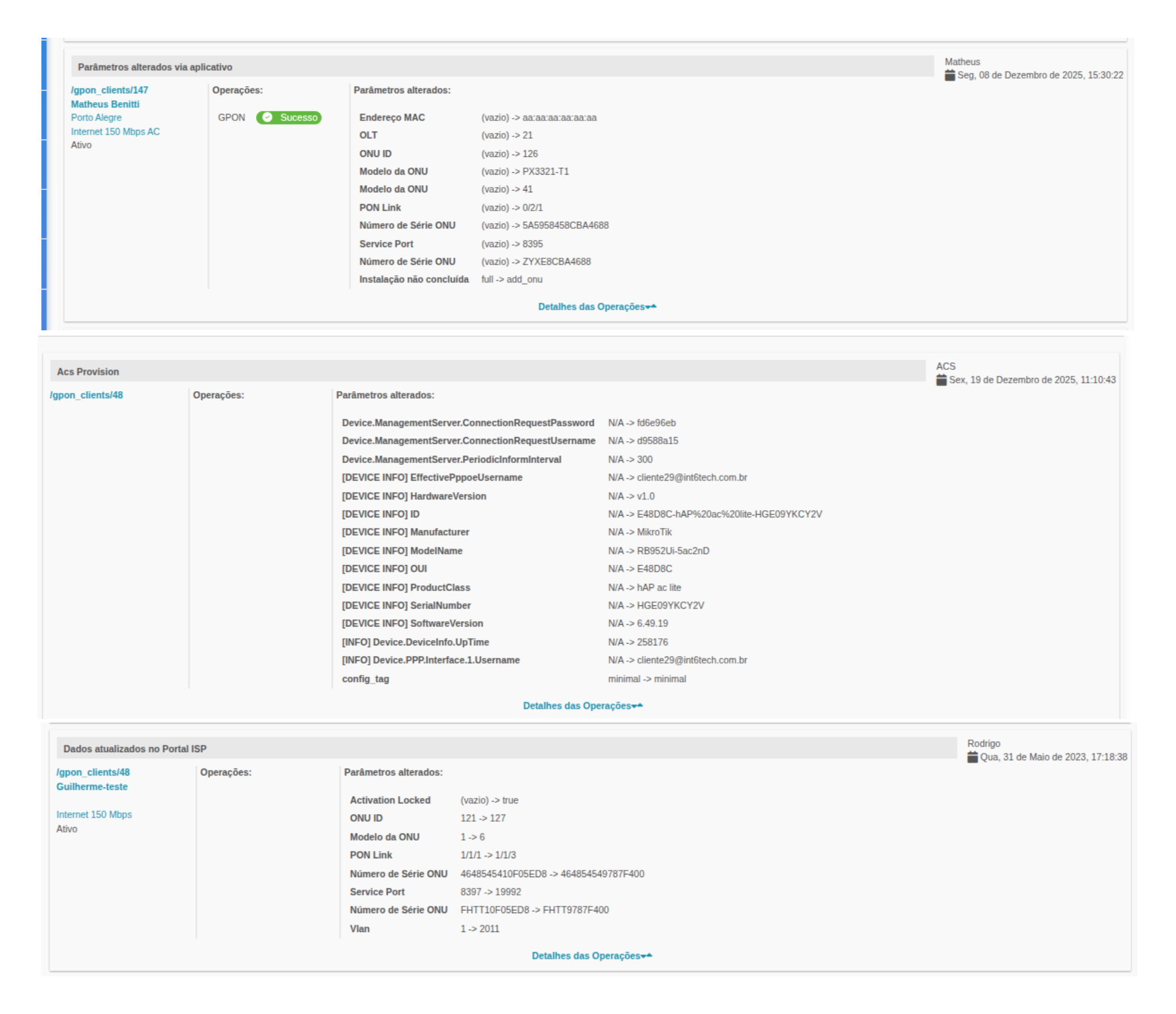
This document describes the Activation Logs, responsible for recording all actions performed on an FTTH / PON subscriber, regardless of the origin of the action.
Logs function as an official technical audit, allowing you to track who executed, when it was executed, what action was performed, and which parameters were changed.
¶ 🎯 Purpose of Activation Logs
Activation Logs are intended to:
- Record technical actions performed on the network
- Identify the origin of the action (Portal, ACS, App, or API)
- Display changed parameters with previous and new values
- Ensure traceability and auditing
- Assist in failure analysis and troubleshooting
- Support investigations of operational errors or automations
¶ 🧭 Origin of Recorded Actions
Actions can be executed from different sources, all recorded in the history:
-
🖥️ Portal
Manual actions performed by administrative users. -
🤖 ACS (TR-069 / TR-369)
Automation for configuration and remote management of ONU/CPE. -
📱 Technical Application
Actions performed in the field during installation, maintenance, or sanitization. -
🔌 API Users
Actions originating from external integrations (ERP, bots, partner systems).
The origin is identified by the executing user, operation context, and action type.
¶ 🧱 Structure of a Log Entry
Each activation log entry is composed of the following blocks:
¶ 👤 Subscriber Identification
Contains basic information about the customer affected by the action:
- PON Client ID
- Subscriber Name
- City
- Subscribed Plan
- Service Status
Example:
pon_clients/147- Name: Matheus Benitti
- City: Porto Alegre
- Plan: Internet 150 Mbps AC
- Status: Active
¶ ⚙️ Executed Operation
Indicates what action was performed and the execution result.
Examples of operations:
- Internet access enabled after installation
- Parameters changed via application
- Plan status changed
- ONU rebooted
- Provisioning / Reprovisioning
- Wi-Fi parameter update
- ONU data cleanup
Operation status:
- 🟢 Success
- 🔴 Error
¶ 🔄 Changed Parameters
This block presents all performed changes, always in the format:
old value >> new value
¶ 🧾 Main Logged Parameters
¶ 🌐 PON Parameters
- MAC Address
- OLT
- ONU ID
- ONU Model
- PON Link
- Service Port
- ONU Serial Number
- Installation status (completed / not completed)
¶ 📶 Wi-Fi / CPE Parameters
- Wi-Fi SSID 2.4GHz
- Wi-Fi SSID 5GHz
- Wi-Fi Password
- AP Username
- AP Password
- Web Port
- Configuration reset or reapplication
¶ 🧠 Operational States
- Plan status
- Applied speed
- ONU reboot
- Post-installation changes
- Sanitization actions
¶ 🕒 Date, Time and Executor
Each log mandatorily records:
- 📅 Exact date and time of execution
- 👤 Executing user
- Portal user
- Technician (Application)
- API user
- Automated process (ACS)
This information enables full auditing, correlation with network events, and time-based analysis.
¶ 🔍 Interpreting Logs in Practice
Activation Logs help answer questions such as:
- Who provisioned or reprovisioned this ONU?
- Was the action manual or automated?
- Was any parameter incorrectly cleared?
- Were there multiple actions in a short time?
- Did the action come from App, Portal, ACS, or API?
- What was the last valid applied state?
¶ 🧪 Analysis Best Practices
✔ Always check:
- Action origin
- Executing user
- Action time relative to the reported event
- Actually changed parameters
⚠ Pay special attention when:
- Values return as
(empty) - There are duplicate actions
- Actions are executed by API users
- There is divergence between App, Portal, and ACS
¶ 🧩 Important Notes
- Logs do not change state, they only record actions
- The absence of parameters indicates no changes applied
- Logs are essential for N2 and N3 Support
- Every integration must generate consistent logs
- Logs are the official source of technical auditing
¶ 📎 Related Documents
- 🧭 Ponlink Summary
- 🔌 PON Provisioning
- 🤖 ACS Automations
- 📱 Technical App – Sanitization and Activation
📌 Important:
Whenever there are doubts about network behavior, analysis should always start with the Activation Logs.