¶ 🧩 Installation Log
The Installation Log tab, located under the Activation section, displays the complete history of provisioning processes performed through the app.
Each row represents an individual APP request, typically generated when a contract is imported and the installation process is started.
¶ 🧭 Overview
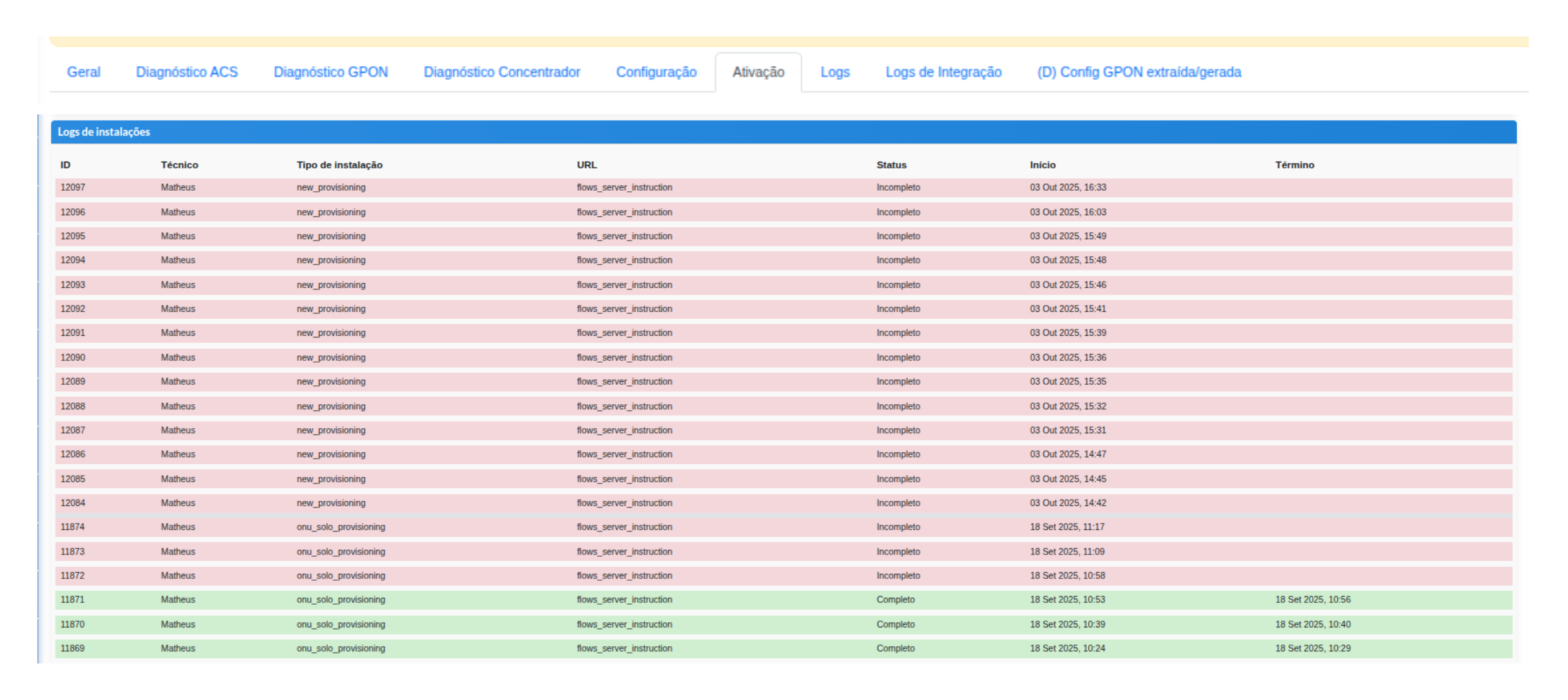
The main table lists the logs for each action performed during provisioning:
| Column | Description |
|---|---|
| ID | Unique identifier for the installation log. |
| Technician | Name of the technician who performed the procedure through the APP. |
| Installation Type | Defines the type of flow that was started (e.g., new_provisioning, onu_solo_provisioning). |
| URL | Path of the request processed by the server (usually flows_server_instruction). |
| Status | Indicates the process result — it can be Complete (green) or Incomplete (red). |
| Start / End | Records the exact time the task was executed. |
¶ 🔍 Log Details
When clicking a row in the table, the system expands the complete information for that process, allowing you to track each step that was executed.
The details include:
- Flow events (e.g., ONU creation, port assignment, registration data update).
- Parameters sent and received during provisioning.
- Requests and responses exchanged with the OLT, showing the executed command and its response.
This level of transparency allows the technical team to analyze exactly where the process was interrupted or successfully completed, without relying on external logs or direct server access.