¶ 🧾 OLT Communication Logs
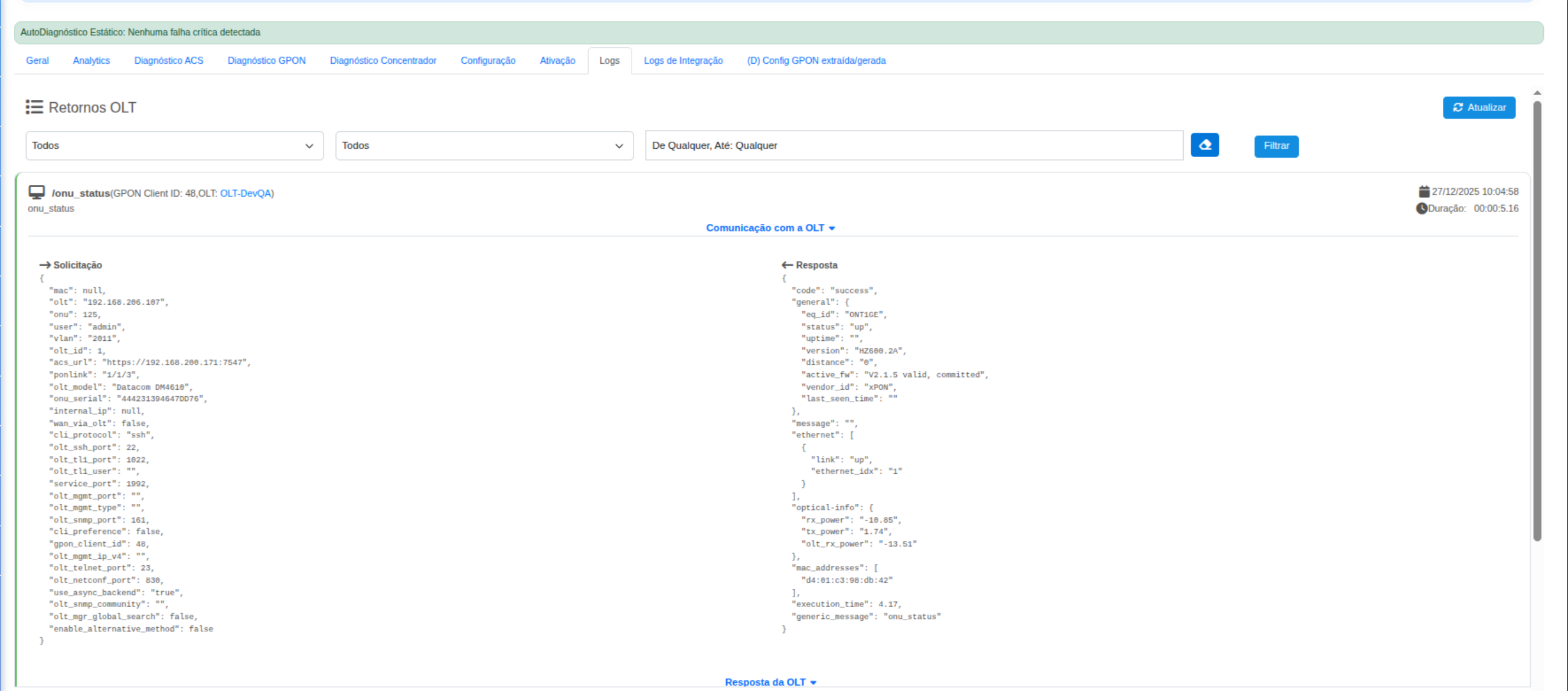
The Logs tab is designed to display, in a detailed and auditable way, all requests sent to the OLT and their corresponding responses, enabling technical analysis, troubleshooting, and validation of provisioning, diagnostics, and automation flows.
This feature is essential for support teams, as it shows exactly what was requested from the OLT and what it returned, without abstraction.
¶ 🎯 Purpose of the Logs Tab
- 🔍 Enable full auditability of communications with the OLT
- 🧠 Facilitate provisioning failure analysis
- ⚙️ Validate sent parameters (PON, ONU, VLAN, ports, protocols)
- 📡 Confirm the real ONU status directly on the OLT
¶ 🖼️ Visual Example – OLT Communication Logs
¶ 🧩 Log Structure
Each log entry is divided into two main sections:
¶ 📤 Request
Represents everything sent to the OLT, including technical parameters, credentials, and operation context.
¶ 🔎 Main request fields:
- OLT IP / Host
- OLT Model (e.g., Datacom DM4610)
- Access User (SSH, SNMP, ACS, etc.)
- ONU / Serial
- PON / Ponlink (e.g.,
1/1/3) - Service VLAN
- Management Ports
- Protocol Used (SSH, SNMP, HTTP)
- GPON Client Identifier
📌 These data points help verify whether the automation or manual action used the correct parameters.
¶ 📥 Response
Represents the direct return from the OLT, without intermediate processing.
¶ 🔎 Most common response information:
- ONU Status (
up,down,unknown) - ONU Model
- Active Firmware
- Vendor
- Execution Time
- Ethernet Port State
- Optical Information
- ONU RX Power
- ONU TX Power
- OLT RX Power
- MAC Address
- Generic OLT messages
📌 This response reflects the real state of the ONU on the equipment, serving as the primary source of truth for diagnostics.
¶ ⏱️ Log Metadata
The log header also displays:
- 📅 Execution date and time
- ⏳ Total operation duration
- 🏷️ Executed action type (e.g.,
onu_status) - 🔗 Action source
- Portal
- Technician App
- ACS
- API
¶ 🛠️ When to Use the Logs Tab
Use this tab whenever there is:
- ❌ Provisioning failure
- 🔄 Mismatch between portal and OLT
- 🤖 Automation errors
- 🧪 Validation of new flows
- 📞 Advanced field support
¶ ✅ Best Practices
- Always compare Request vs Response
- Validate if the PON and ONU are correct
- Check execution time (timeouts may indicate access issues)
- Use logs as technical evidence in support tickets
📌 Summary:
The Logs tab is the main transparency point between the Portal/App and the OLT, enabling precise diagnostics, reducing rework, and increasing operational reliability.