¶ 🛠️ Edit Internet Customer
The Edit Internet Customer screen allows managing the entire ONU provisioning lifecycle directly through the Portal.
From this screen, it is possible to:
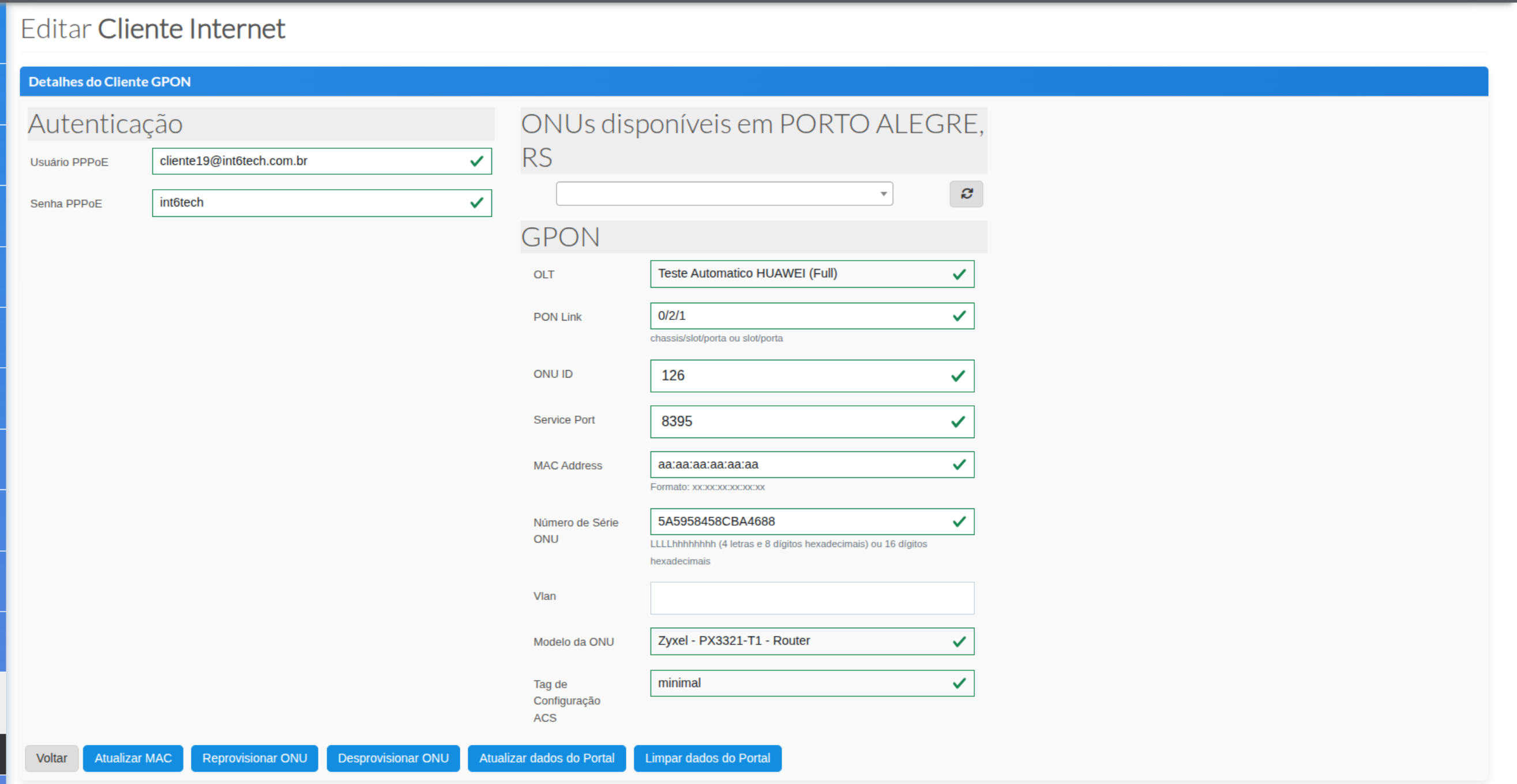
- Provision a new device
- Reprovision an existing ONU
- Deprovision and clean data
- Update portal information
- Check available ONUs on the OLT
- Edit PPPoE credentials and specific settings
This is one of the most important screens in the PON workflow.
¶ 🔍 PON Customer Details
The top section displays the customer's PPPoE authentication information:
- PPPoE Username
- PPPoE Password
These data are retrieved from the ERP and can be manually adjusted when necessary.
¶ 🛰️ Available ONUs on the OLT
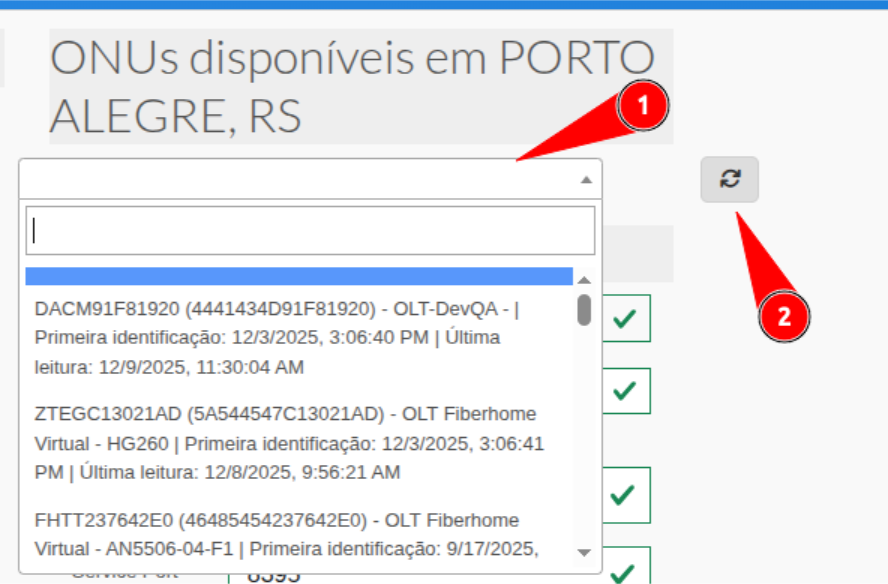
In the “Available ONUs in (city/state)” section, the system displays ONUs detected on the OLT that have not yet been provisioned (awaiting authorization state).
¶ 🔄 Refresh Button (Discovery)
The refresh button performs an instant discovery on the OLT, retrieving:
- Newly connected ONUs
- Devices awaiting authorization
- ONUs in pending state
This process simplifies provisioning for new installations.
¶ 🧩 PON Section (Technical Data)
The following fields are displayed and used during provisioning:
- OLT → OLT where the customer is provisioned
- PON Link → Physical port in chassis/slot/port format
- ONU ID → Numeric ONU ID on the OLT
- Service Port → Service created on the OLT
- MAC Address → Router or ONU MAC (depending on configuration)
- ONU Serial Number → Serial detected by the OLT
- VLAN → Internet service VLAN
- ONU Model → Must be filled manually
- ACS Configuration Tag → Profile applied in ACS
¶ 📌 Important
Only the ONU Model field is manual.
All other fields are automatically populated based on OLT detection and provisioning.
¶ ⚡ Action Buttons (Footer)
The bottom section of the page contains buttons that control the ONU lifecycle.
They are essential for provisioning and diagnostic operations.

¶ 🔵 Update MAC
Updates only the MAC Address registered for the customer, without affecting the OLT configuration.
Used when:
- Customer changes router
- Old MAC does not match
- PPPoE authentication needs adjustment
¶ 🔵 Reprovision ONU (Used for Provisioning and Reprovisioning)
This button has a dual function:
- Provision a new ONU detected in discovery
- Reprovision an existing ONU on the OLT
Allows fixing:
- Service Port
- VLAN
- Incorrect profiles
- Incorrectly provisioned ONU
- Issues after PON port change
This is one of the most frequently used operational buttons.
¶ 🔵 Deprovision ONU
Completely removes the ONU from the OLT and clears all data in the portal.
Performs:
- ONU removal from the OLT
- Service-port removal
- Profile removal
- Full PON data cleanup in the Portal
Used in:
- Deinstallation
- ONU replacement
- Deep corrections
- Reinstallation on a new port
¶ 🔵 Update Portal Data
Updates ONLY the Portal data without changing anything on the OLT.
Used when:
- Information is inconsistent
- Internal data needs synchronization
- Changes were made manually on the OLT and must be reflected in the Portal
¶ 🔵 Clear Portal Data
Clears only the PON registration in the Portal, but does not affect the OLT.
The ONU remains:
- Authorized
- Configured
- Fully operational
Used when:
- Portal data is incorrect
- Changes were made directly on the OLT
- ONU needs to be re-imported without deletion from the OLT
- Fixing display inconsistencies
¶ 📝 Final Summary
The Edit Internet Customer screen is used for:
- Full provisioning
- Quick fixes
- Reprovisioning
- Data cleanup and updates
- Viewing detected ONUs on the OLT
- PPPoE adjustments
It is one of the most powerful and sensitive interfaces in the Portal, used daily by activation, support, and NOC teams.