¶ 🔄 Latest Status Changes
The Latest Status Changes panel records all recent changes in the ONU status, including optical variations, outages, recoveries, and events generated by both the platform and the OLT.
This view is essential for support teams, as it allows quick analysis of the ONU behavior over time.
¶ 🧭 Overview
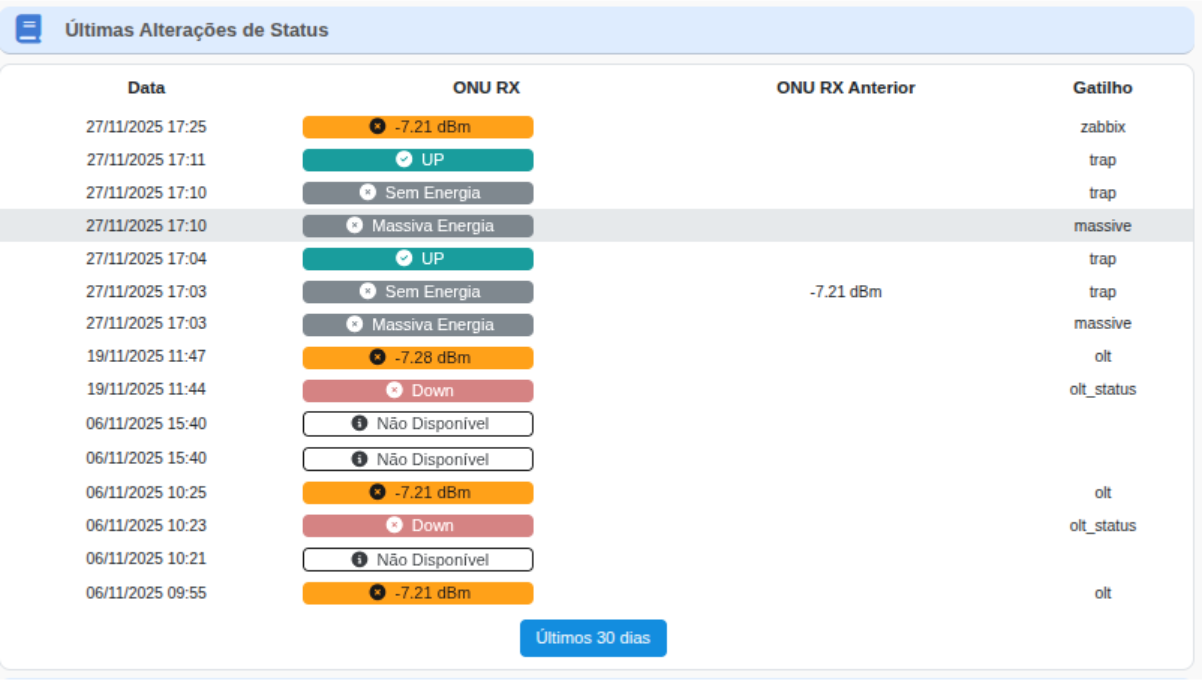
Each row in the table represents a relevant change detected by the system.
Monitored events include:
- Changes in optical power (ONU RX)
- Power outages
- Loss of signal (LOS)
- Connectivity recovery
- UP / DOWN status
- ONU unavailable
- Mass events affecting multiple ONUs
- Changes triggered by different sources (zabbix, trap, massive, olt, etc.)
¶ 📘 Field Descriptions
| 📌 Field | 📄 Description |
|---|---|
| Date | The exact time when the status change was recorded by the platform or the OLT. |
| ONU RX |
The new ONU optical power value or newly detected state, such as:
• -7.21 dBm (valid optical power) • UP (ONU resumed communication) • Power Loss (dying-gasp) • Mass Power Outage (collective power outage) • Down (ONU offline) • Unavailable (no reading received from the OLT) |
| Previous ONU RX | The optical power value or status immediately before the event. This allows comparison between the previous status and the new one. |
| Trigger |
The source of the detected event. Examples:
• zabbix – external automated monitoring • trap – alert sent by the ONU/OLT • massive – mass outage event • olt – direct reading from the OLT • olt_status – direct status change reported by the OLT |
¶ 🎯 Use by the Support Team
The status change history helps the team to:
- Identify outage trends and frequent recoveries
- Detect intermittent optical issues
- Verify whether the ONU is flapping between UP and DOWN states
- Correlate changes with mass events or OLT-specific events
- Monitor behavior during critical time periods
- Confirm power outages (dying-gasp)
- Identify temporary absence of RX readings (“Unavailable”)
¶ 🔍 Interpretation of the Main States
| Status | Meaning |
|---|---|
| UP | ONU resumed normal communication. |
| Power Loss | ONU shut down due to loss of power. |
| Mass Power Outage | Power outage affecting multiple ONUs at the same time. |
| Down | ONU offline without a dying-gasp event. |
| Unavailable | No optical reading available at the time of the query. |
| dBm | Measured optical power; useful for identifying outages caused by poor RX levels. |
¶ 📝 Final Summary
The Latest Status Changes panel provides a detailed and chronological history of ONU behavior.
It is essential for quick analysis, identifying instability patterns, and understanding the triggers that cause changes in the optical and operational status of the ONU.