¶ 📉 Mass Outages
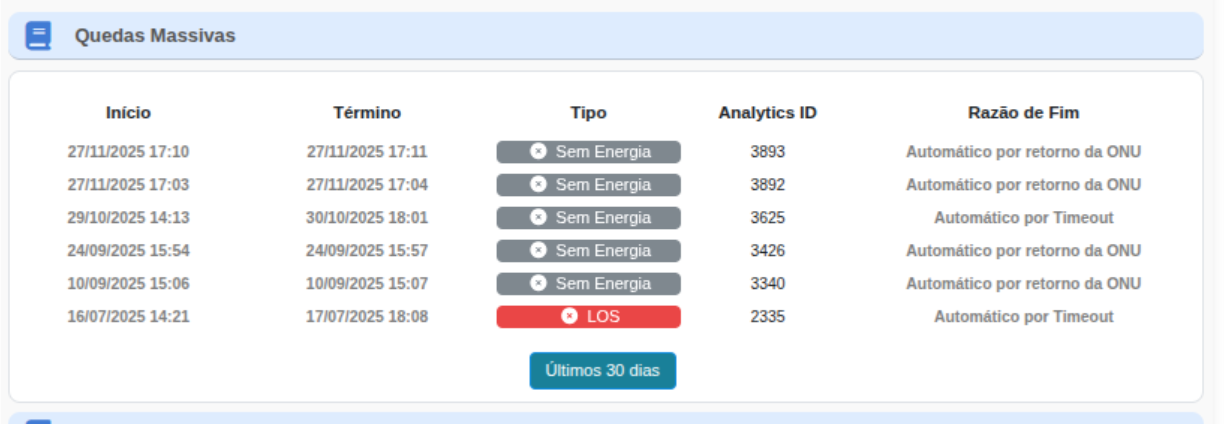
The Mass Outages panel displays all events where multiple ONUs were simultaneously impacted in the same region, FOTB, splitter, or PON port.
This view allows identification of collective incidents and speeds up response by the Support and NOC teams.
¶ 🧭 Overview
When the platform detects that several ONUs entered a critical state within the same time interval, a Mass Outage event is registered.
These records display:
- Start and end time
- Outage type (Power Loss, LOS, Timeout)
- Analytics ID
- End reason
¶ 📘 Field Description
| 📌 Field | 📄 Description |
|---|---|
| Start | Moment when the mass event was detected, as multiple ONUs started reporting failure simultaneously. |
| End | Time when the event ended, after normalization of signals from affected ONUs. |
| Type |
Automatic classification of the predominant cause: • Power Loss – ONU sent a dying-gasp indicating power failure. • LOS – Total optical signal loss. • Timeout – ONU stopped responding due to prolonged inactivity. |
| Analytics ID | Internal identifier that allows tracing the event in analytics systems, logs, and audits. |
| End Reason |
Reason that closed the event: • Automatic – ONU Restored • Automatic – Timeout Indicates the recovery method detected by the platform. |
¶ 🎯 Application for the Support Team
Mass Outage records are used to:
- Identify regional or collective incidents
- Detect fiber cuts, pole falls, or OLT failures
- Confirm neighborhood-wide power outages
- Track problematic PON ports
- Prioritize field support actions
- Correlate with external alarms and logs
¶ 🔍 How to interpret the Outage Type?
| Type | Interpretation |
|---|---|
| Power Loss | ONU shut down due to lack of power (dying-gasp). |
| LOS | Complete optical signal loss — possible fiber cut or disconnection. |
| Timeout | ONU stopped responding for an extended period. |
¶ 📝 Final Summary
The Mass Outages panel is an essential tool for collective impact analysis, enabling fast identification of events affecting multiple customers simultaneously.
It helps Support and NOC teams make quick decisions, correlate root causes, and act proactively.