¶ 📡 RADIUS Records (Last 20)
The RADIUS Records section displays the history of the subscriber's last 20 PPPoE connections registered by the RADIUS server.
This information allows analysis of session stability, connection duration, disconnections, disconnect reasons, and authentication parameters.
It is an essential tool for Support, NOC, and Engineering teams, especially when analyzing intermittent authentication issues or PPPoE disconnections.
¶ 🧭 What Is Displayed?
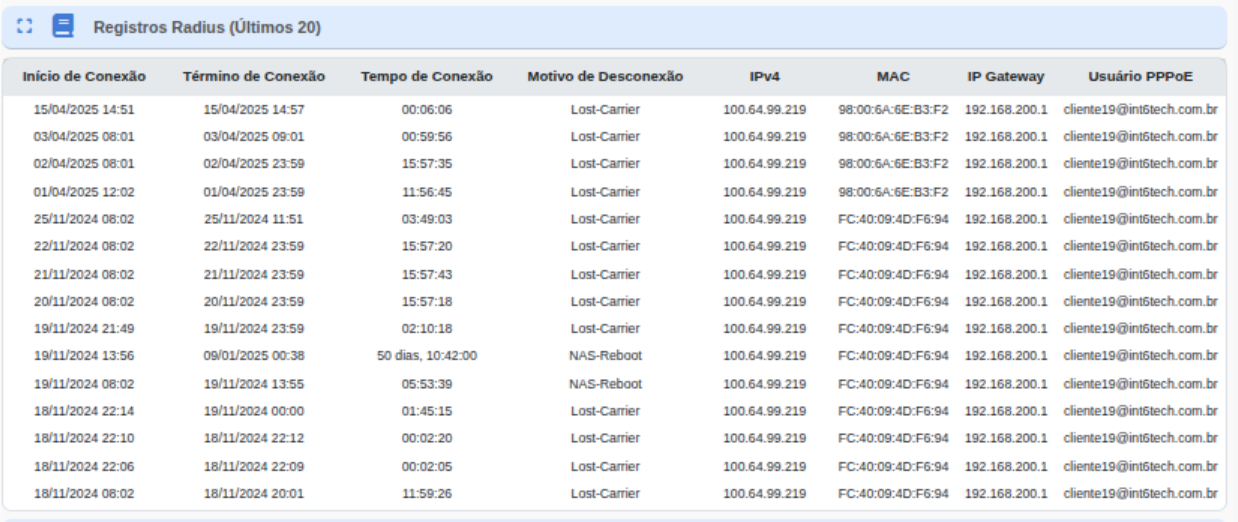
Each row represents a PPPoE session initiated by the customer (or by the customer's router).
The system displays:
- Connection start and end time
- Session duration
- Disconnect reason
- Assigned public/private IP address
- Authenticated MAC address
- Assigned gateway
- PPPoE username used
¶ 📘 Field Descriptions
| 📌 Field | 📄 Description |
|---|---|
| Connection Start | The time when the PPPoE session was successfully established on the RADIUS server. |
| Connection End | The time when the PPPoE session was terminated by the customer, router, or server. |
| Connection Time | The total session duration. Helps identify frequent disconnections or instability (very short sessions). |
| Disconnect Reason |
Indicates the reason why the session was terminated:
• Lost-Carrier – Loss of the physical link (router reboot, cable issue, power outage, ONU restarting). • NAS-Reboot – The edge/network access device restarted. • Admin-Reset – Manual disconnection. Other reasons may appear depending on the provider's infrastructure. |
| IPv4 | The IP address assigned to the customer during the session. It may be a public or private IP address, depending on the provider's policy. |
| MAC | The MAC address authenticated by RADIUS. Allows validation that authentication is coming from the correct device. |
| Gateway IP | The gateway assigned to the customer during the PPPoE session. |
| PPPoE Username | The PPPoE credential used for authentication (usually obtained from the ERP). Helps confirm whether the customer is using the correct login. |
¶ 🎯 Use by the Support Team
The panel is essential for diagnosing PPPoE connection issues, allowing the team to identify:
- Frequent disconnections
- Very short sessions
- Frequent IP changes
- Physical link loss (Lost-Carrier)
- Router restarts
- ONU instability
- Incorrect PPPoE login usage
- Authentication using a different MAC address
¶ 🔍 Common Analysis Examples
¶ ✔ Very short sessions (seconds or a few minutes)
May indicate instability:
- Router freezing
- ONU restarting
- LAN issues
- Power outages
¶ ✔ Recurring Lost-Carrier
Usually caused by:
- Frequent router reboots
- Unstable power supply
- ONU restarting due to temperature/power issues
- Loose LAN cable between ONU ⇄ router
¶ ✔ Very long session (days)
Indicates stability — healthy behavior.
¶ 📝 Final Summary
The RADIUS Records (Last 20) panel provides a complete view of the customer's PPPoE connections, allowing the identification of authentication issues, instability, power-related outages, restarts, and physical access failures.
It is one of the most important tools for analyzing browsing and PPPoE connectivity issues.