¶ 🔍 PON Information
On the subscriber's SAC screen, information is organized into panels.
The first panel available for reference is PON Information, where the user can view data related to the provisioning of the ONU/ONT equipment.
When the contract is provisioned through the App, Portal, or is correlated, the following information will be displayed.
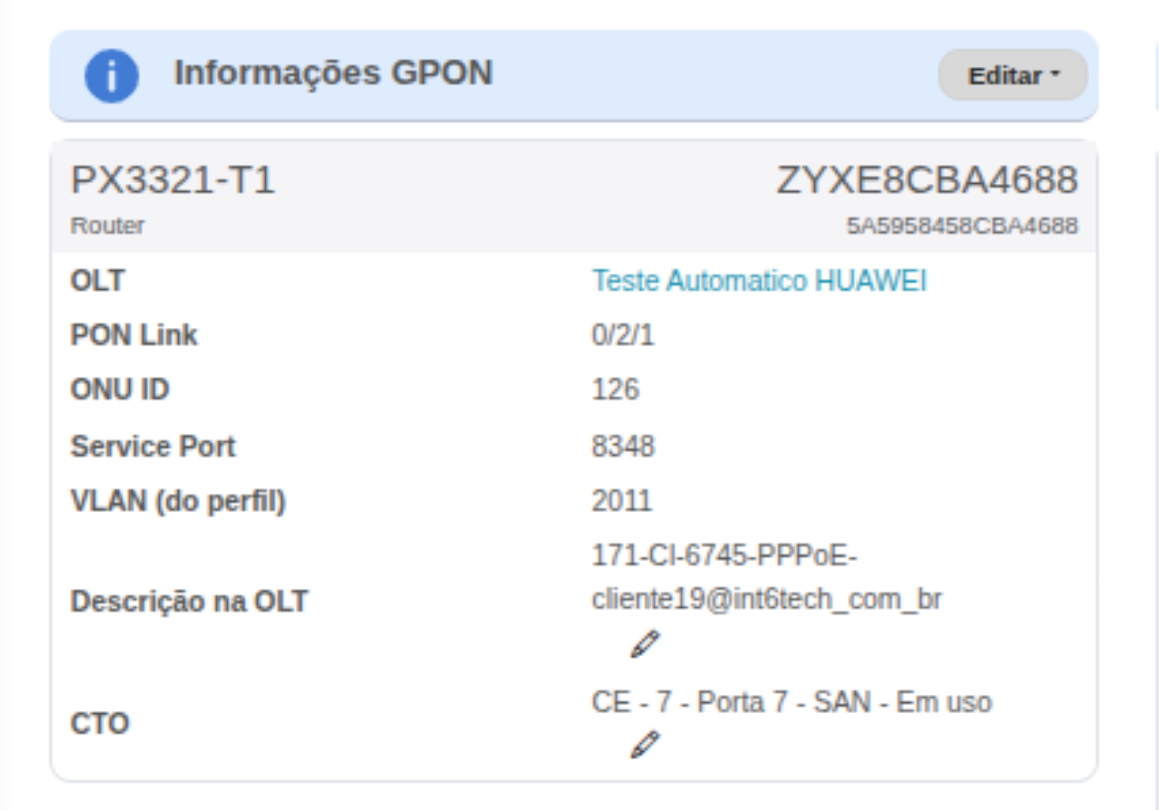
- Equipment Model
- Long serial and short serial
- OLT
- PON Link
- ONU ID
- Service Port
- VLAN (from profile)
- OLT Description
- FOTB
- Edit Button
¶ 🧠 PON Terms – Simplified Explanation
Below you will find a summary of the main terms displayed in the PON Information panel, with simple and accessible explanations for users who are not in the telecom field.
¶ 📘 Overview
These items allow you to identify:
- the customer's equipment,
- its position in the provider's network,
- technical parameters applied during provisioning.
¶ 📊 PON Terms Table
| 🔧 Term | 📝 Acronym | 📘 Meaning | 📄 Simplified Description |
|---|---|---|---|
| Equipment Model | — | — | Model name of the ONU/ONT installed at the customer's premises. |
| Long Serial and Short Serial | SN | Serial Number | Unique identifier for the ONU — like a social security number for the device. |
| OLT | OLT | Optical Line Terminal | Provider equipment that distributes fiber to customers. |
| PON Link | PON | Passive Optical Network | Connection from the OLT port/splitter to the customer's ONU. |
| ONU ID | ONU | Optical Network Unit | Internal identifier of the ONU within the OLT. |
| Service Port | — | Service Port | Logical channel used to enable internet and services. |
| VLAN (from profile) | VLAN | Virtual Local Area Network | Code that separates and organizes internet traffic. |
| OLT Description | — | — | Additional registered information, such as address or reference notes. |
| FOTB | FOTB | Fiber Optical Termination Box | Street-side box where the customer's fiber is connected. |
| Edit Button | — | — | Allows manual adjustments to provisioning information. |
¶ 📝 Final Summary
The terms presented allow you to quickly understand:
- Where the customer is connected,
- Which equipment is being used,
- And how internet service reaches the premises.