¶ 🧭 Ponlink Summary
The Ponlink Summary provides a consolidated view of the active PON on a specific OLT, displaying the overall status of connected ONUs, their optical power levels, and performance statistics.
This screen is essential for optical monitoring, integration auditing, and identifying large-scale network events.
¶ ⚙️ Overview
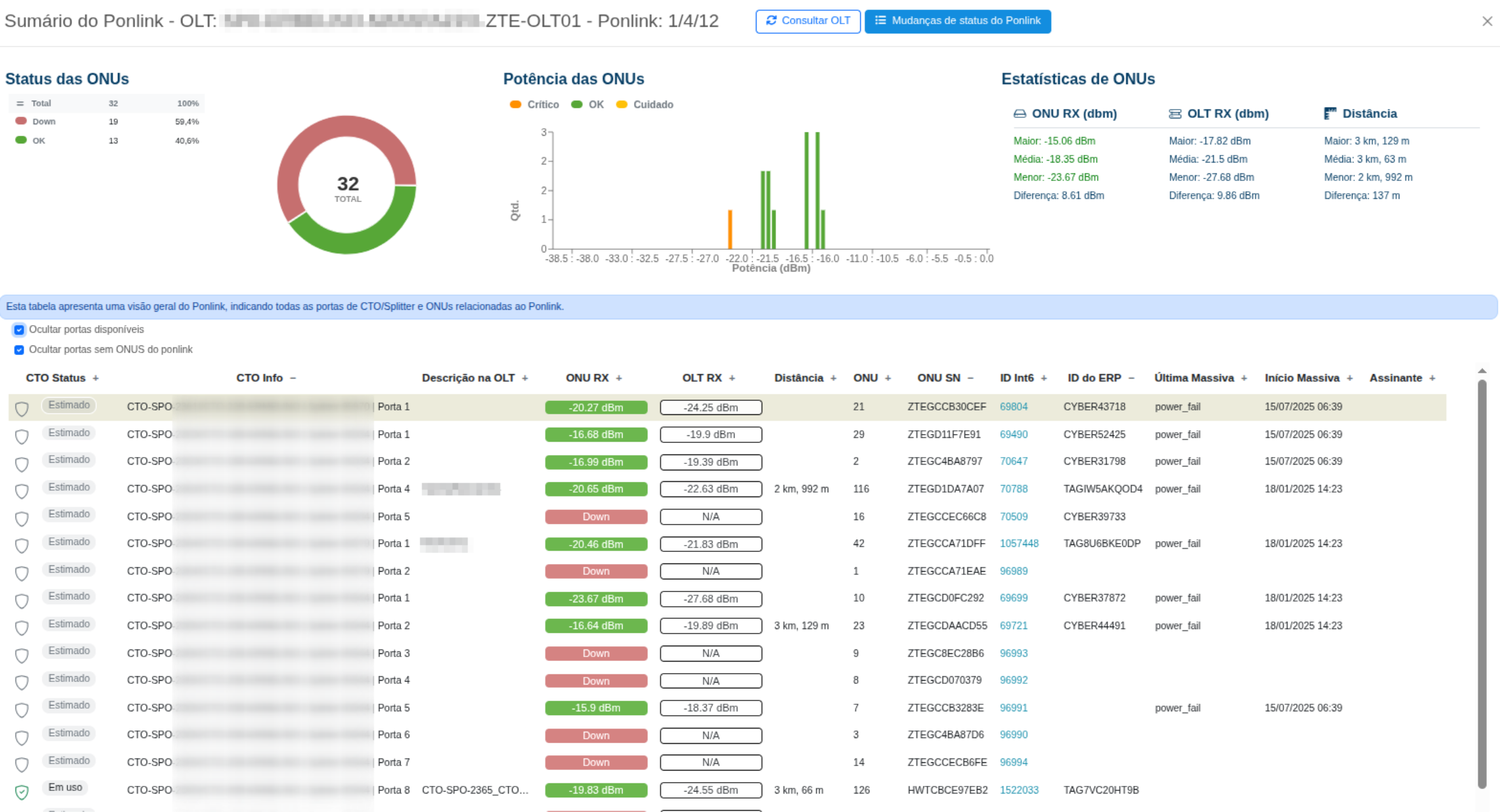
When the Ponlink Summary feature is accessed, the customer's PON is displayed with the main elements on the screen:
- ONU Status — percentage of active and inactive (Down) ONUs.
- ONU Power (RX) — visual distribution of power levels measured in dBm.
- Overall Statistics — average, minimum, and maximum optical readings.
- Detailed Table — relationship between FOTBs, ONUs, distances, and identifiers.
¶ 🔦 ONU Power
The optical power (RX) chart displays the distribution of signal levels measured by the ONUs.
It allows you to quickly identify:
- ONUs with weak signal;
- Significant power differences between customers;
- Degradation patterns that may indicate splitter issues.
📈 In the example, most ONUs operate between -15 and -19 dBm.
¶ 📉 ONU Statistics
| Metric | Description |
|---|---|
| 📉 ONU RX | Displays the optical power levels received by the ONUs (dBm), including the recorded minimum, maximum, and average values. This data makes it possible to compare the individual performance of each ONU and identify significant signal variations. |
| 📈 OLT RX | Shows the optical power readings measured by the OLT, also including minimum, maximum, and average calculations. Comparing OLT RX and ONU RX helps validate the optical balance of the network. |
| 📏 Distance | Indicates the estimated distance between each ONU and the OLT (in meters), with statistics for the shortest, longest, and average distance. This information helps correlate optical loss with the physical length of the link. |
📌 Quick analysis:
- Differences between ONUs on the same PON may indicate optical imbalance.
- A large difference between OLT RX and ONU RX may indicate losses in the link or fiber splice.
¶ 🧩 Detailed FOTB and ONU Table
The main table lists the FOTB ports currently in use and their associated ONUs.
It is used to correlate registration data (FOTB, port, and subscriber) with technical operating parameters.
| FOTB | Status | ONU RX | OLT RX | Distance | Subscriber |
|---|---|---|---|---|---|
| FOTB-1 | Splitter 01 | Port 2 | 🟢 OK | -16.6 dBm | -19.8 dBm | 3 km | Active subscriber |
| FOTB-1 | Splitter 01 | Port 5 | 🔴 Down | N/A | N/A | — | No reading |
📋 Reading tips:
- 🟢 OK — ONU is active and communicating normally.
- 🔴 Down — ONU is inactive (it may be powered off or have no optical link).
- ⚪ Estimated — position inferred by the system without a direct reading.
¶ ✅ Best Practices
- Compare the difference between ONU RX and OLT RX to evaluate optical balance.
- Analyze degradation trends (variations of 2–3 dB over time).
- Use it together with GPON Diagnostics to confirm the individual status of ONUs.
- Monitor the Last Mass Event field to identify when the system performed the most recent automatic reading.