¶ Port Mapping
Port mapping is a feature that allows you to redirect incoming internet traffic to a specific device within your local network.
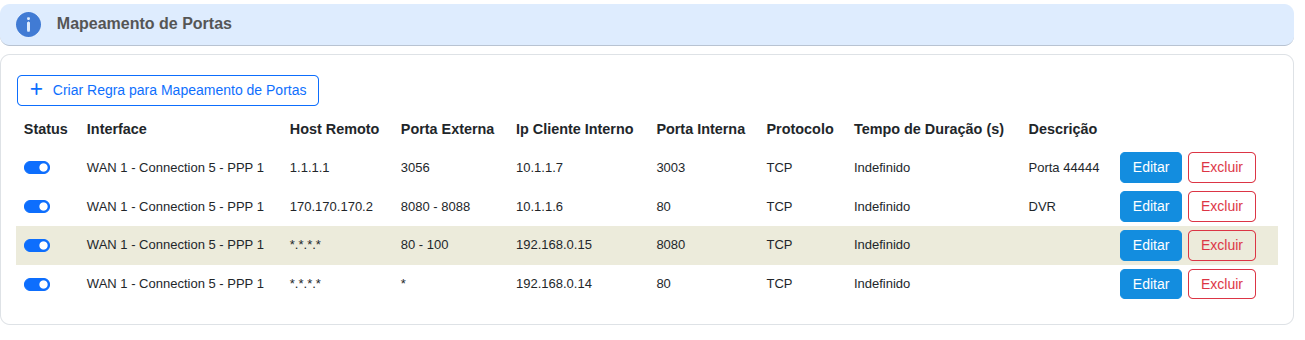
Port Mapping displays the following information for each forwarding rule:
Status: Indicates whether the rule is active or inactive.
Interface: The network interface to which the rule applies.
Remote Host: The IP address of the traffic source host. Can be a specific address or a wildcard (*) for any IP.
To allow from any source, leave this field blank.
External Port: The port that receives incoming traffic from the internet. Can be a single port or a range (e.g., 80 - 88).
To allow from any source, leave this field blank.
Internal Client IP: The IP address of the device on your local network to which traffic will be forwarded.
Internal Port: The port used by the application on the internal device.
Protocol: The communication protocol used (TCP or UDP).
Duration (s): The validity period of the rule.
Description: A brief description to identify the purpose of the rule.
In addition, the table includes Edit and Delete buttons to manage each mapping rule.
¶ Creating a Port Mapping Rule
When clicking "Create Port Mapping Rule", the initial configuration screen will be displayed in two ways, depending on the device management standard: TR-181 or TR-098.
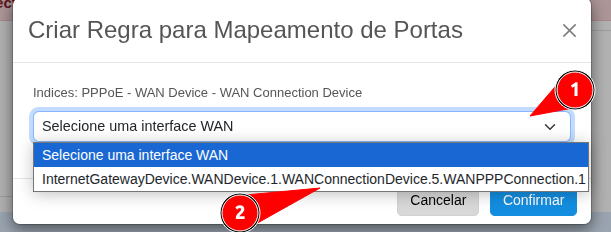
1. TR-098 Standard
A screen will be shown to select the WAN interface by clicking on the index.
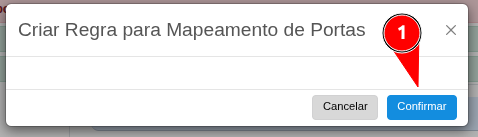
2. TR-181 Standard
A screen will be shown to CONFIRM the rule creation only.
¶ Configuring the Mapping Rule
After creating the rule, click Edit to begin configuration and enable it for use.

When clicking Edit, this screen will be displayed so you can configure and enable the port mapping rule by filling in the required information.
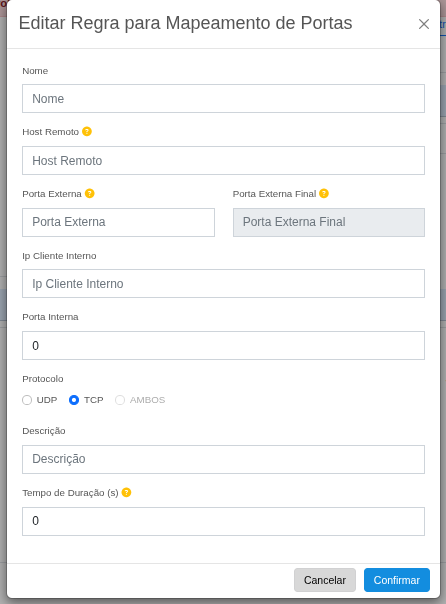
Name
→ This field must be a unique identifier for the rule (e.g., IP Camera, Web Server).
In the TR-181 standard, it is filled in automatically. To better describe the type of service associated with the port, use the Description field.
Remote Host
→ External IP address or domain that will be allowed to access the service.
To allow from any source, leave this field blank.
External Port / Final External Port
→ Enter the port (or port range) to be exposed externally.
Example: 8080 or 1000 - 2000.
Internal Client IP
→ IP address of the device on the internal network that will receive the traffic (e.g., 192.168.0.10).
Internal Port
→ The service port on the internal device.
Typically the same as the external port.
Protocol
→ Choose UDP, TCP, or BOTH, depending on the type of service.
Description
→ Optional field for notes (e.g., DVR remote access).
Duration (s)
→ Time in seconds to keep the rule active.
0 means it never expires.
Confirm
→ Click to save and apply the rule.