- Subscriber: searches by subscriber name.
- ERP ID: searches by the subscriber identifier in the ERP system.
- Subscriber ID: searches by the subscriber's internal identifier.
- CPF/CNPJ: searches by the registered CPF or CNPJ.
¶ Subscribers Index
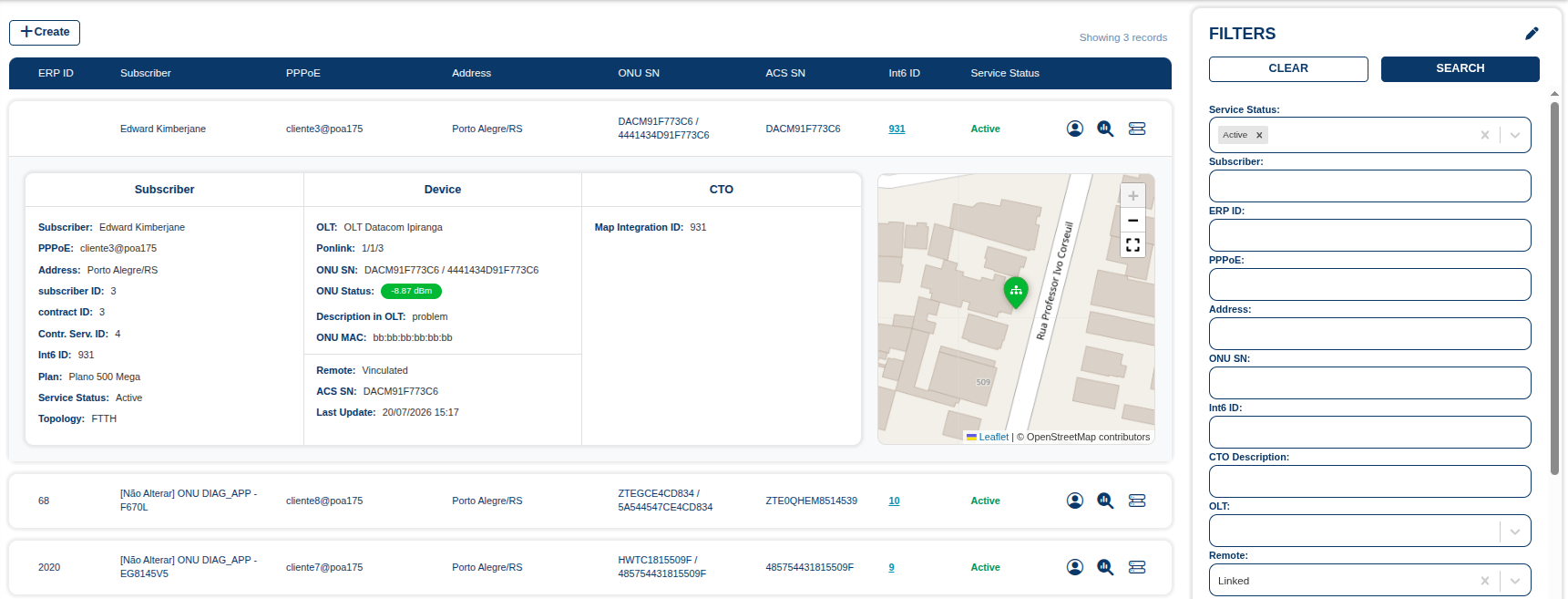
Screen responsible for centralizing the search, viewing, and management of subscriber information.
It allows users to locate customers using different search criteria, review registration and technical data, check service status, and access information about equipment and network infrastructure.
¶ Filters
The filter panel allows users to refine subscriber searches using registration, contract, and technical information.
Filters can be used individually or combined. The more information is provided, the more specific the search will be.
¶ Available filters
Subscriber information
Contract and service information
- Service Status: filters subscribers by the current service status, such as Active.
- Contract ID: searches by contract identifier.
- Contract Service ID: searches by the identifier of the service associated with the contract.
Access information
- PPPoE: searches by the PPPoE username used to authenticate the subscriber.
- Address: searches by the registered address.
ONU and device
- ONU SN: searches by ONU serial number.
- ONU MAC: searches by ONU MAC address.
- Description in OLT: searches by the ONU description configured in the OLT.
- Learned MACs: searches by MAC addresses learned by the ONU or network.
Network infrastructure
- OLT: filters by the OLT linked to the subscriber.
- Ponlink: filters by the Ponlink to which the subscriber is connected.
- CTO Description: searches by the CTO description associated with the subscriber.
- Port Observations: searches by observations recorded for the port.
ACS
- ACS Serial Number: searches by the serial number of the device registered in ACS.
- ACS MAC: searches by the MAC address of the device registered in ACS.
Partner
- Partner: filters by the partner associated with the subscriber.
- Partner Code: searches by the partner identification code.
- Partner Description: searches by the partner description or name.
Integrations and additional information
- Int6 ID: searches by the subscriber's integration identifier.
- Remote: filters according to the configured remote link.
- QR Code Drop: searches by the QR Code information associated with the drop.
- Map Integration ID: searches by the identifier used for map integration.
The Search button runs the search using the specified criteria.
The Clear button removes all applied filters and resets the fields to their initial state.
¶ Features
The screen provides the following features:
- Create — starts registering a new subscriber.
- Search — runs a search using the selected criteria in the filter panel; filters can be used individually or combined.
- Clear — removes the applied search criteria, making it easier to start a new query.
- Subscriber details — expanding a record shows the Subscriber, Device, CTO, and Location on the map sections. Click anywhere on the record to open it.
¶ Subscriber quick actions
On the right side of each subscriber record, three quick-action buttons provide direct access to subscriber and network infrastructure information and features.
¶ SAC screen
Opens the subscriber's SAC screen. Also accessible from the subscriber's Int6 ID.
¶ Ponlink summary
Opens a summary of the subscriber's PON link information and related network details.
¶ OLT screen
Opens the OLT screen associated with the subscriber, with OLT-related information and features.