¶ Wi-Fi Information
This section displays all SSIDs (Wi-Fi networks) configured on the equipment, organized by band (2.4 GHz and 5 GHz).
It allows you to view and edit basic information for each wireless network.
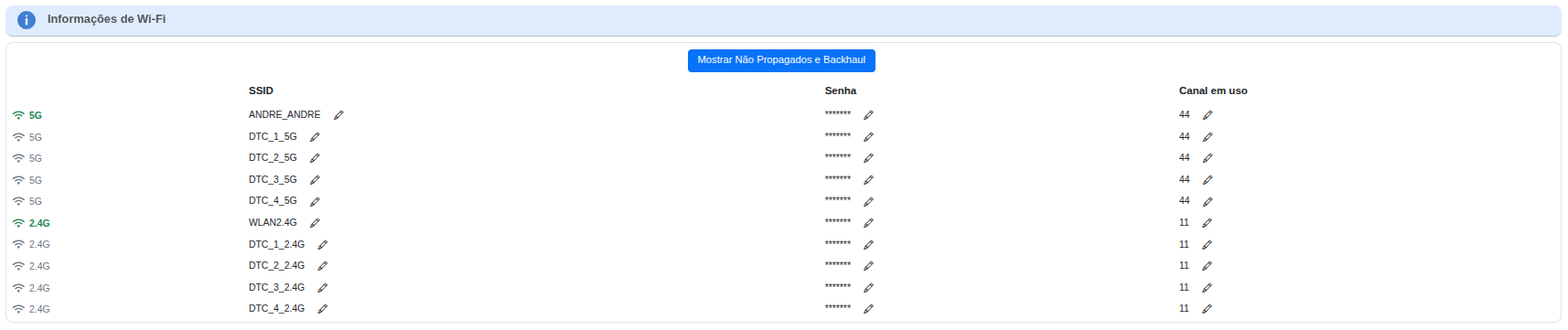
| Band | SSID | Password | Channel in use |
|---|---|---|---|
| 5 GHz | Displays the networks configured on this frequency band, generally offering higher performance and less interference. | Shows the current network password (hidden by default, with an edit option). | Indicates the current operating channel (e.g., 44). Can be adjusted as needed. |
| 2.4 GHz | Lists the networks on this band, recommended for greater range and compatibility. | Same behavior as the 5 GHz network password. | Configured channel (e.g., 11), useful for avoiding frequency overlap with nearby routers. |
⚙️ Available features
✏️ Edit SSID – allows you to rename the Wi-Fi network.
🔒 Edit password – updates the network access key.
📶 Change channel – manually adjusts the operating channel to optimize performance and reduce interference.
👁️ Show Hidden Networks – displays non-broadcasted SSIDs.