¶ Release Notes - 26.07.2
¶ 🆕 New Features
--
¶ 1. OLT Manager interface modernization
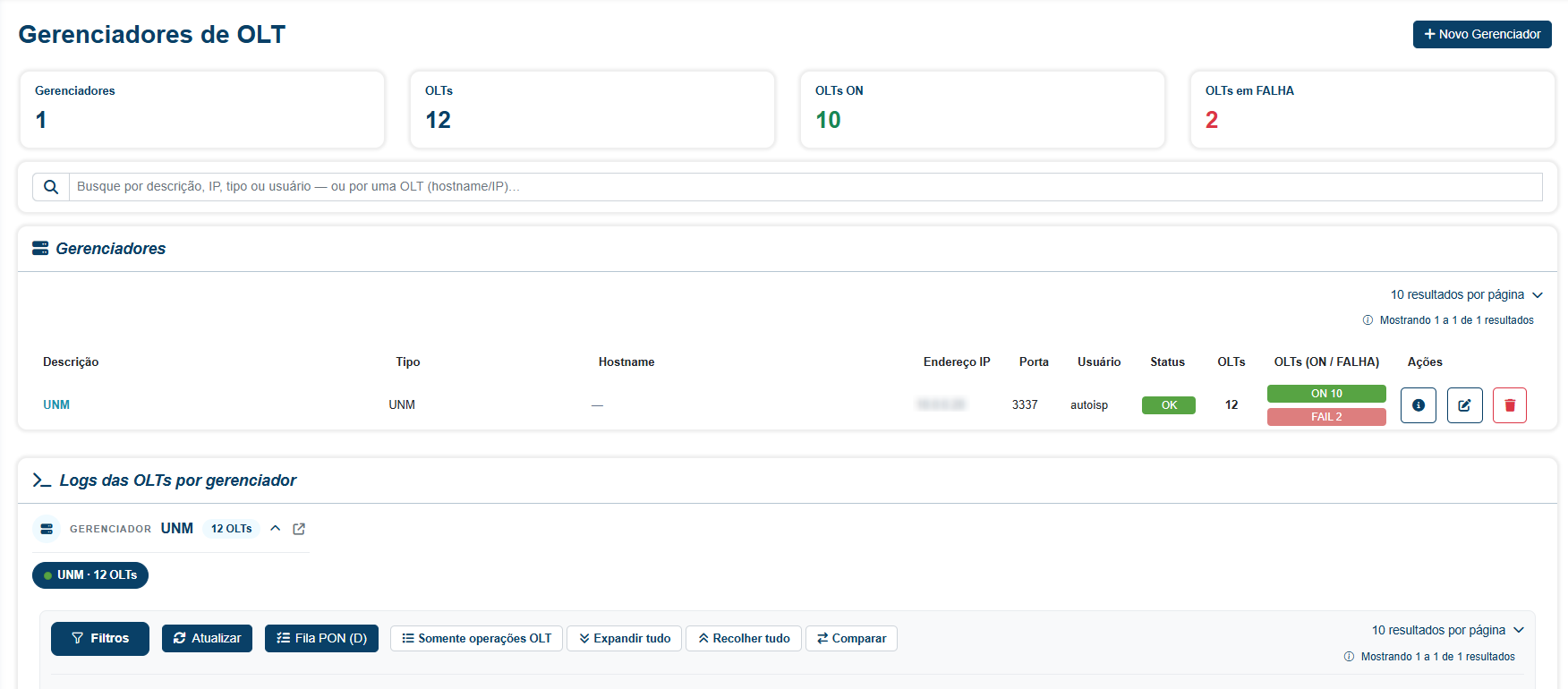
We elevated the infrastructure management experience with a complete overhaul of the OLT Manager page, accessible through the PON Infra → OLT Managers menu.
With this update, infrastructure teams gain a much more agile and intuitive interface, including the new capability to view aggregated logs from all OLTs linked to a manager on a single screen.
¶ ✨ Improvements
--
¶ 1. Advanced management and transparency in CTO Sanitizations
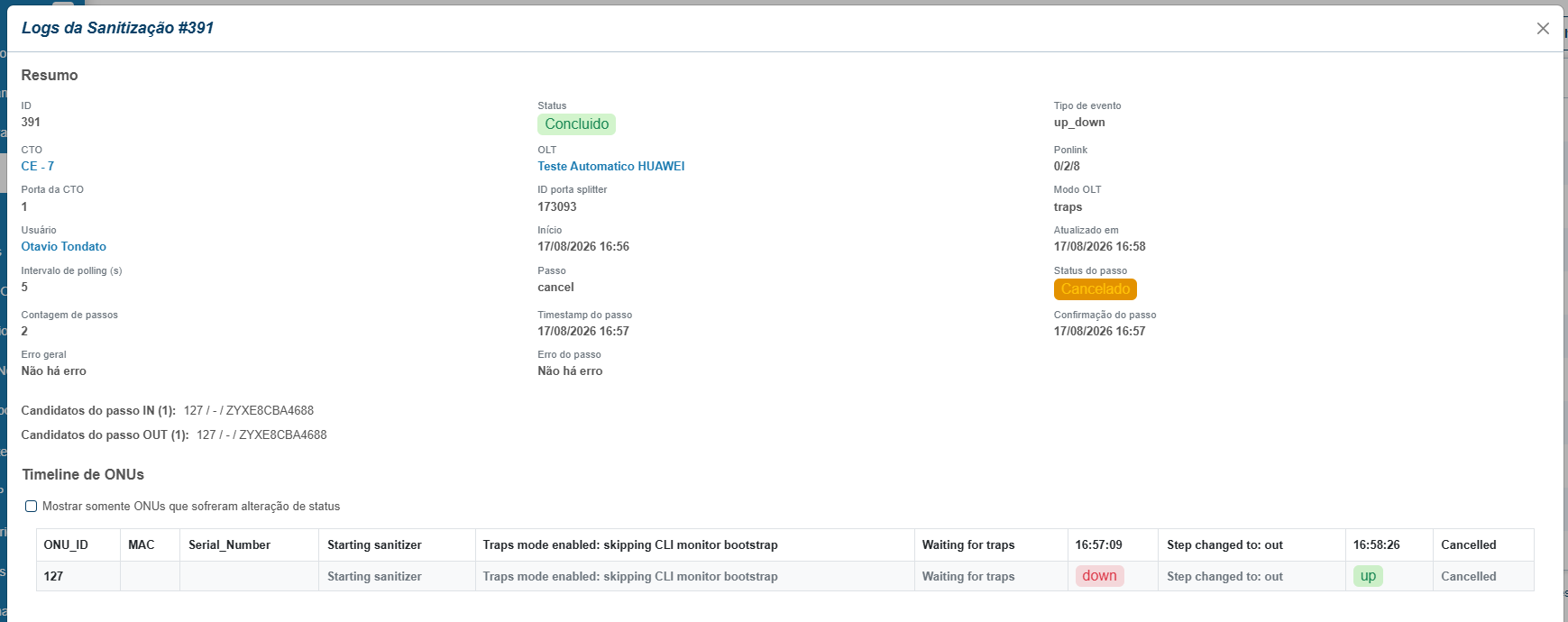
Implemented support for canceling sanitization processes directly through the Portal, along with enrichment of the operational logs modal.
The new functionality allows running activities to be interrupted with a single click, while the new logs panel centralizes detailed information about OLTs, ports, users, and process steps, eliminating the need to consult external tools for technical diagnostics.
--
¶ 2. Improved communication stability with ZTE OLTs
Adjusted the CLI communication interval for equipment from manufacturer ZTE, adding a 0.5s delay between sending consecutive commands to the OLT, aiming to mitigate instabilities identified in specific scenarios.
By implementing a controlled wait time between command submissions, the platform ensures greater reliability in request processing by the hardware, reducing connection failures during diagnostics and provisioning routines.
--
¶ 3. OLT Resources interface modernization
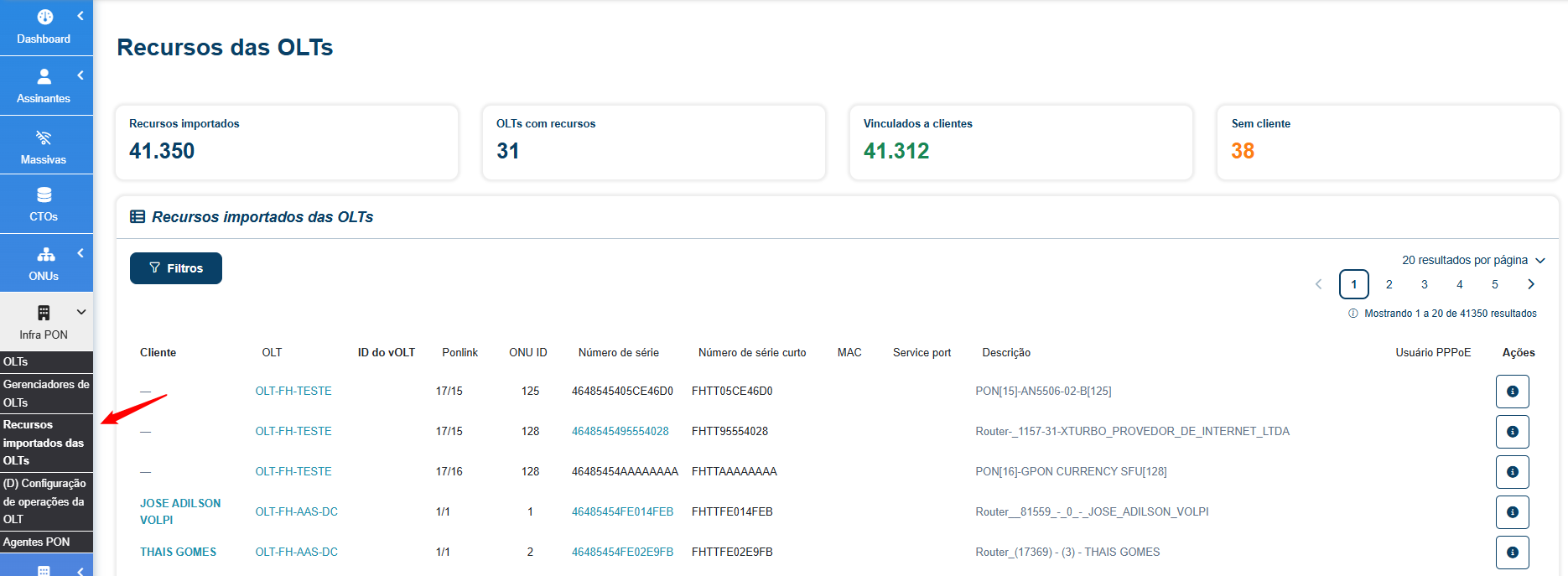
The OLT Resources screen has been fully updated, aligning it with the Portal's new visual identity and performance standards.
With this update, the management of imported resources now offers a smoother, more intuitive experience integrated into the platform's modern ecosystem, facilitating the daily operations of GPON infrastructure teams.
--
¶ 4. New Noise chart in Customer Analytics
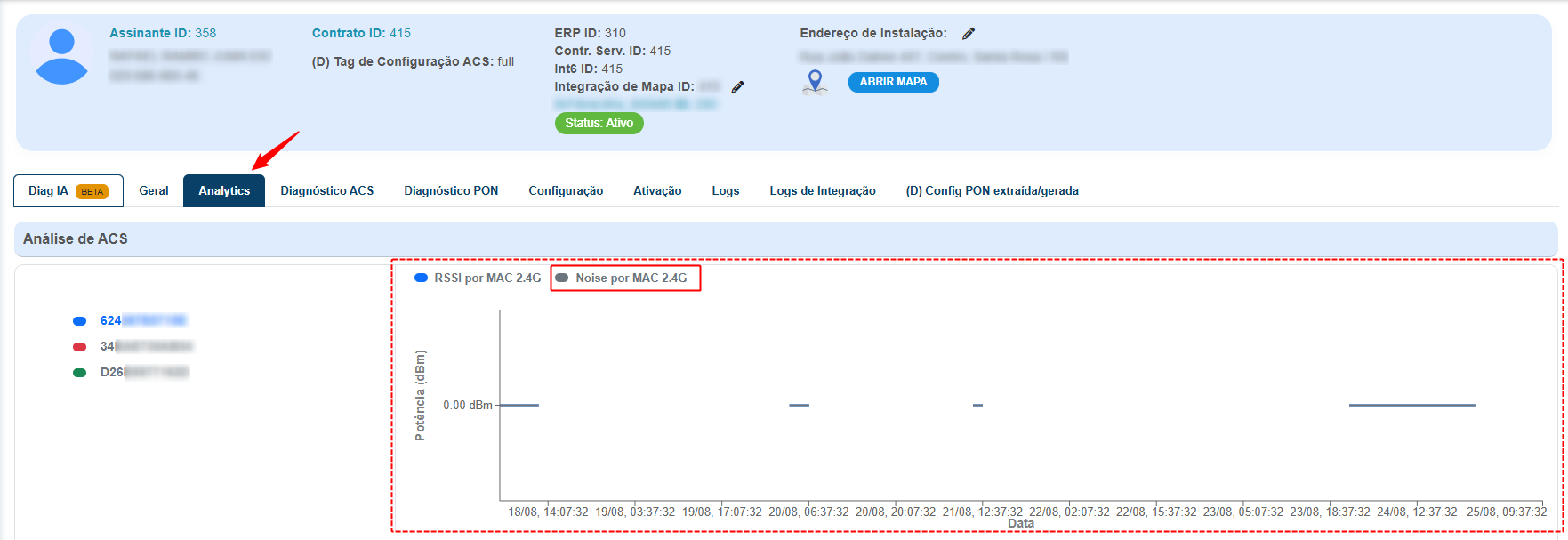
We expanded the Portal's diagnostic capabilities with the inclusion of detailed Noise charts in the Analytics data.
With this new visualization, support teams can accurately identify external interference affecting connection quality.
--
¶ 5. Enhanced visibility for Mass Outage Events, start and end trap details
We improved operational transparency in Mass Outage Event monitoring with the introduction of expandable columns for trap messages.
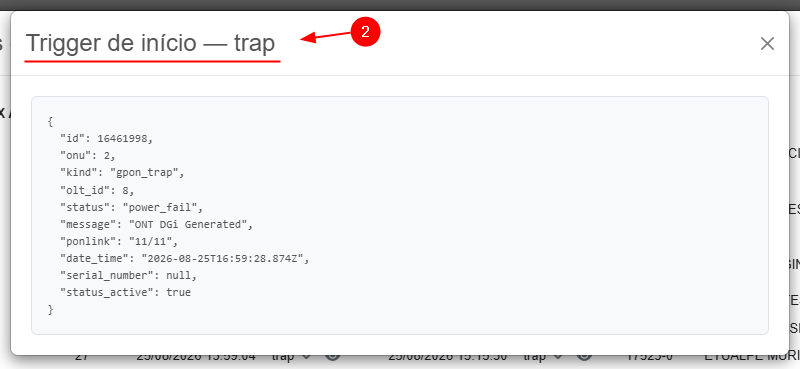
Now, support and NOC teams can view the complete and detailed content of alerts generated by equipment directly in the list of affected resources, without cluttering the main interface. With a single click, it is possible to expand the source message or access the raw log (JSON), enabling a much faster diagnosis of the root cause of network incidents and eliminating the need for manual searches in external logs.

1 - To expand and check the trap type.
2 - To access the trap details, as shown in the figure below:
--
¶ 6. Improved GPON MAC traceability
We refined physical address management on the network by adding location information and fixing filters in the OLT MAC table.
Now, each entry in the GPON MAC table displays the Ponlink column, making it possible to instantly identify which physical port the device belongs to. Additionally, we fixed critical failures that caused system errors when attempting to filter by MAC Address or Serial Number, ensuring smooth navigation and precise device searching, which dramatically speeds up connectivity issue diagnostics and ONU identification.
--
¶ 7. New filtering experience in Subscriber Search
We modernized the customer search interface, bringing the flexibility of custom profiles to the Subscriber Search screen. Previously, the filter sidebar was static and limited, making it difficult to access specific fields.
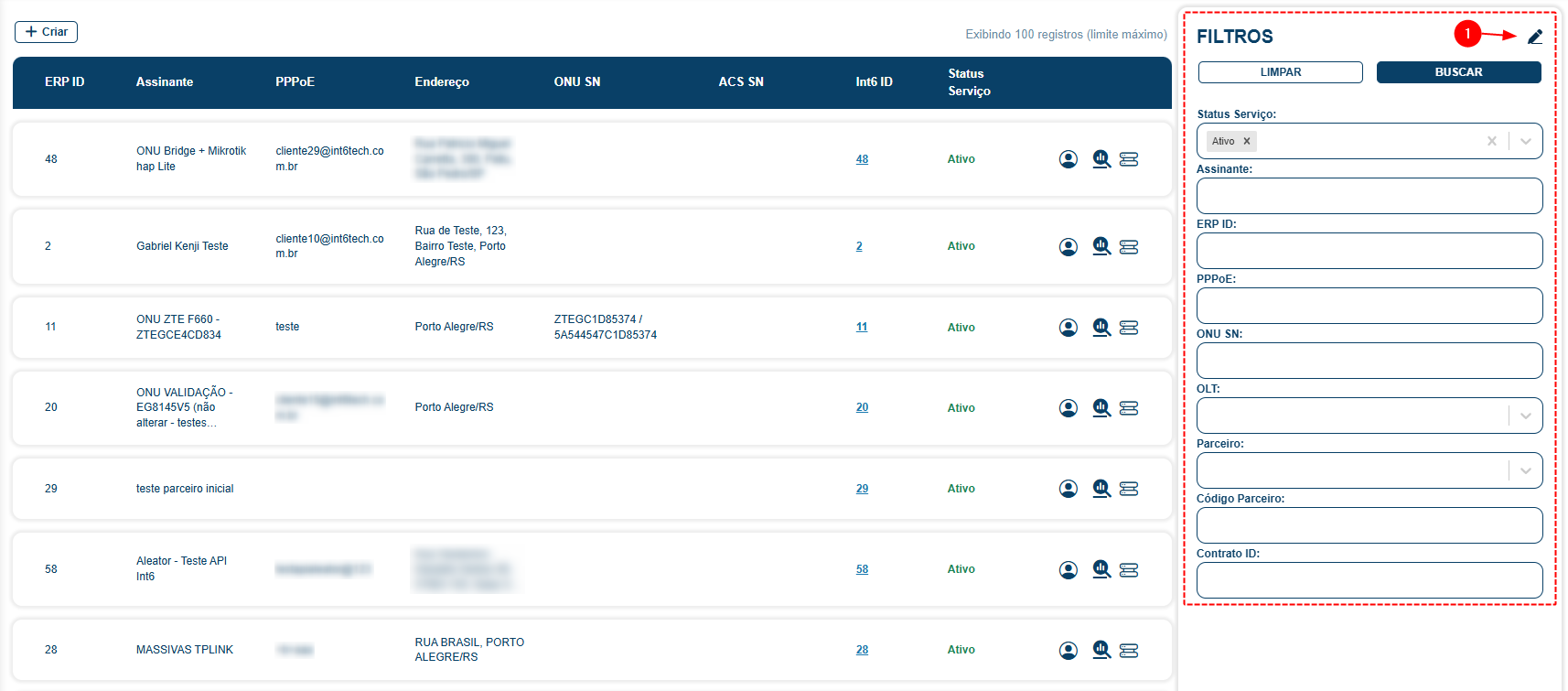
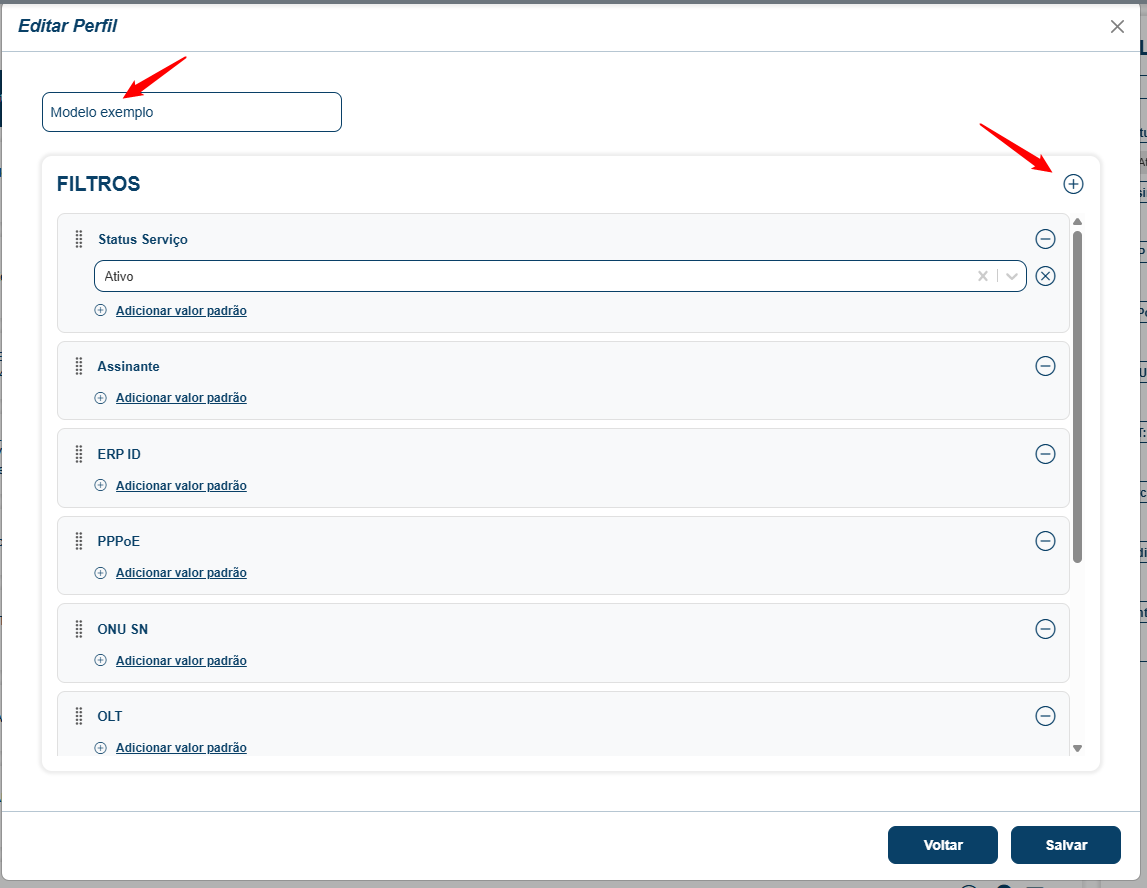
Now, each user can create, reorder, and save their own filter sets. Additionally, we introduced the concept of a "Default Profile" per provider, ensuring the team always has the best initial configuration available, all with a much cleaner and more intuitive interface that automatically saves their preferences.
--
¶ 8. Smart port ordering in the Diagnostics Table
We refined the visual organization of the Diagnostics Table, bringing a logical and intuitive hierarchy to infrastructure visualization.
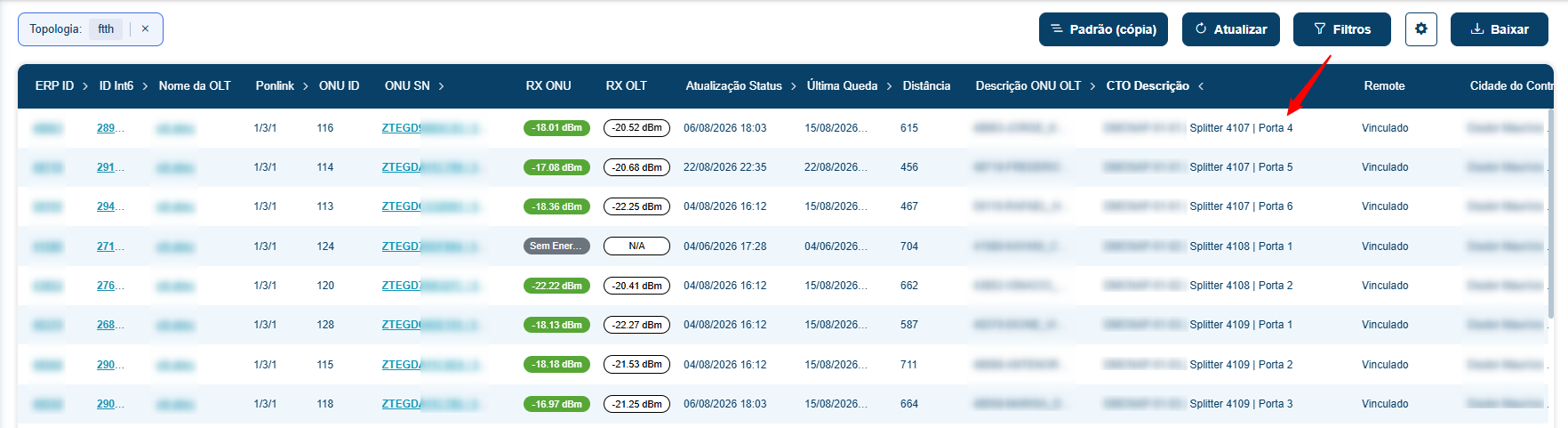
Previously, when sorting by the "CTO Description" column, ports and splitters appeared jumbled, making it difficult to read assets sequentially; with the new composite ordering, the system now automatically groups by CTO, followed by splitter, and finally by port in numerical order (1, 2, 3...). This provides a much clearer and more organized view of the network, allowing field and support teams to quickly identify the physical occupancy of each CTO.
--
¶ 9. Time zone synchronization in OLT Alarms
We fixed a critical display issue that caused a 3-hour offset in OLT alarm and history timestamps.
Previously, event records were displayed in raw UTC format; the system now uses the ISO8601 standard with automatic conversion to the browser's local time zone. This ensures that each operator views the exact moment of occurrence according to their local clock, eliminating interpretation errors and speeding up response to network failures.
--
¶ 10. New contract status: Waiting for Connection
We expanded contract lifecycle management capabilities with the introduction of the new "Waiting for Connection" status (waiting_for_connection).
Previously, the system did not have a state that accurately represented contracts in the initial activation phase, which caused inaccuracies in reports and dashboards.
--
¶ 11. Improvement in Internet Plan Import
We transformed the manual import of plans into a transparent and error-proof process, ensuring the integrity of commercial data.
Previously, when uploading plan spreadsheets (CSV), the system provided no feedback on errors or duplicates, which made it difficult to fix large files; now, we implemented an analysis engine that automatically identifies invalid rows, normalizes separators, and intelligently handles duplicates. The portal now displays a detailed summary of what was processed and offers a button to download only the ignored rows, allowing the team to quickly fix and re-import data without losing what has already been successfully processed.
¶ 🐞 Fixes
--
¶ 1. Adjustment in Wi-Fi signal reading for TP-Link devices
Fixed the issue that caused discrepancies in the Signal Strength report on routers from manufacturer TP-Link.
With this update, the Portal now prioritizes data collection through the standard diagnostic protocol, ensuring that the information displayed on the platform is identical to that reported on the equipment's interface, making wireless network diagnostics more accurate and reliable for the support team.
--
¶ 2. Fix in description formatting for Neutral Network
We fixed a flaw in GPON description processing that caused integration errors with Neutral Network partners (such as VOA).
The issue occurred due to the presence of improper spaces in identification strings, which interrupted the provisioning flow; with the adjustment to the validation engine, spaces are now automatically replaced with underscores, ensuring communication with partner systems occurs without interruptions and with full compatibility.
--
¶ 3. Restoration of Wi-Fi management via ACS
We fixed a precedence bug that prevented changing Wi-Fi passwords via ACS, displaying error INT-2014.
The issue occurred because the system incorrectly identified that Wi-Fi was being managed by the OLT, even when there was no active configuration; with the adjustment to the detection logic, the Portal now correctly distinguishes the source of management, ensuring that changes via ACS work perfectly again for all compatible devices, eliminating mass failures in support operations.
--
¶ 4. Stabilization of communication with ZTE OLTs
Adjustment to the ZTE driver to defer line clearing (Ctrl+U) until confirmation of a response from the OLT, preventing command corruption under high latency.
--
¶ 5. Integrity fix in the Ponlink Summary
We fixed a display issue in the ONU quick summary that improperly listed customers on incorrect PON ports.
Previously, customers logically registered on one port but physically connected to splitters on another ended up appearing in the compact summary of both, causing confusion about the actual network occupancy; with the new filtering rule, the system now ensures that the compact list exclusively displays customers belonging to that specific port, keeping the view of physical conflicts available only in the full summary for technical analysis, which provides a much cleaner and more reliable view of the GPON infrastructure.
--
¶ 6. Flexibility in WiFi Management via OLT
We fixed an access restriction that prevented wireless network configuration in specific scenarios, ensuring full autonomy for support teams.
Previously, editing WiFi credentials in the portal was improperly blocked for users without ACS permission, even when network control was performed directly via the OLT.
¶ 📲 Technician APP - Improvements and Fixes
--
¶ 1. Fix in Sanitization status signaling in the APP
Adjusted the monitoring flow to ensure correct signaling of processes in progress on the platform.
--
¶ 2. Fix for unexpected closure in the FWA flow
Fixed a critical error that caused the App to close when entering the equipment identification code (IMEI) in FWA provisioning flows.
--
¶ 3. Optimization of wait time in Sanitization flows
We replaced the fixed wait time with intelligent response detection during sanitization processes in the App.
Previously, the fixed 5-second wait could cause failures on equipment with slower processing; now, the system dynamically waits for the first data to be received before releasing the action to the technician, ensuring greater stability and eliminating timeout errors across different OLT models.
--
¶ 4. Fix in a step of the GPON provisioning flow
We fixed a critical behavior where provisioning continued to be attempted even when the ONU was not found on the network, which generated generic errors and confusion for the technician; now, the system rigorously validates the presence of the equipment before proceeding, ensuring the flow stops immediately if the ONU is not detected.
--
¶ 5. Smart assistant for power reading
We improved the field technician's experience with the introduction of proactive guidance during signal reading failures.
Now, if the app encounters technical difficulties and fails in three consecutive power reading attempts, it will automatically display a notice guiding the professional to remove and reconnect the optical fiber on the equipment; this small change in the flow helps quickly resolve common physical connection issues.
--
¶ 6. Visibility of CTO notes in the Sanitization App
We enhanced field information transparency with the inclusion of CTO notes directly in the sanitization app's expandable menu.
This improvement allows technicians to view critical notes and specific details of each CTO without leaving the main flow; by highlighting this data, we ensure that vital information previously entered is taken into account during maintenance and audit activities.
--
¶ 7. Quick access via QR Code in the Sanitization App
We optimized asset identification in the field by displaying the QR Code directly in the CTO summary, eliminating unnecessary clicks.
Previously, to check the QR Code of a splitter port, the technician had to enter the CTO's edit mode, which made the audit process slow.
--
¶ 8. Reduced rework with new Summary Screen in the Flows
An intermediate confirmation screen was created in the app so the technician can review the entered data before triggering GPON provisioning.
To prevent installation flows from being aborted late due to typing errors, we implemented a new summary screen that presents all data entered by the technician before final execution; this allows immediate correction of mistaken information, eliminating the need to redo entire GPON provisioning processes and ensuring the process is completed successfully on the first attempt.