¶ title: Troubleshooting: Dashboard of Daily Installations
description: This document explains how to read the Daily Installations Dashboard and troubleshoot common discrepancies or errors in the metrics.
published: true
date: 2026-09-01T02:30:28.755Z
tags: troubleshotting, install_instructions, dashboard
editor: markdown
dateCreated: 2026-09-01T01:00:11.520Z
¶ Troubleshooting: Dashboard of Daily Installations
The Daily Installations Dashboard is a crucial tool for monitoring the performance and success rate of our field teams and system deployments. It provides a daily snapshot of installation activity, allowing us to quickly identify operational bottlenecks or technical issues in the field.
¶ Locating the Dashboard
To access these metrics, navigate to the main menu on the left sidebar.
- Click on the Dashboard menu.
- Select the General tab.
- Scroll down to the bottom of the page to find the installation metrics.

¶ Dashboard Overview
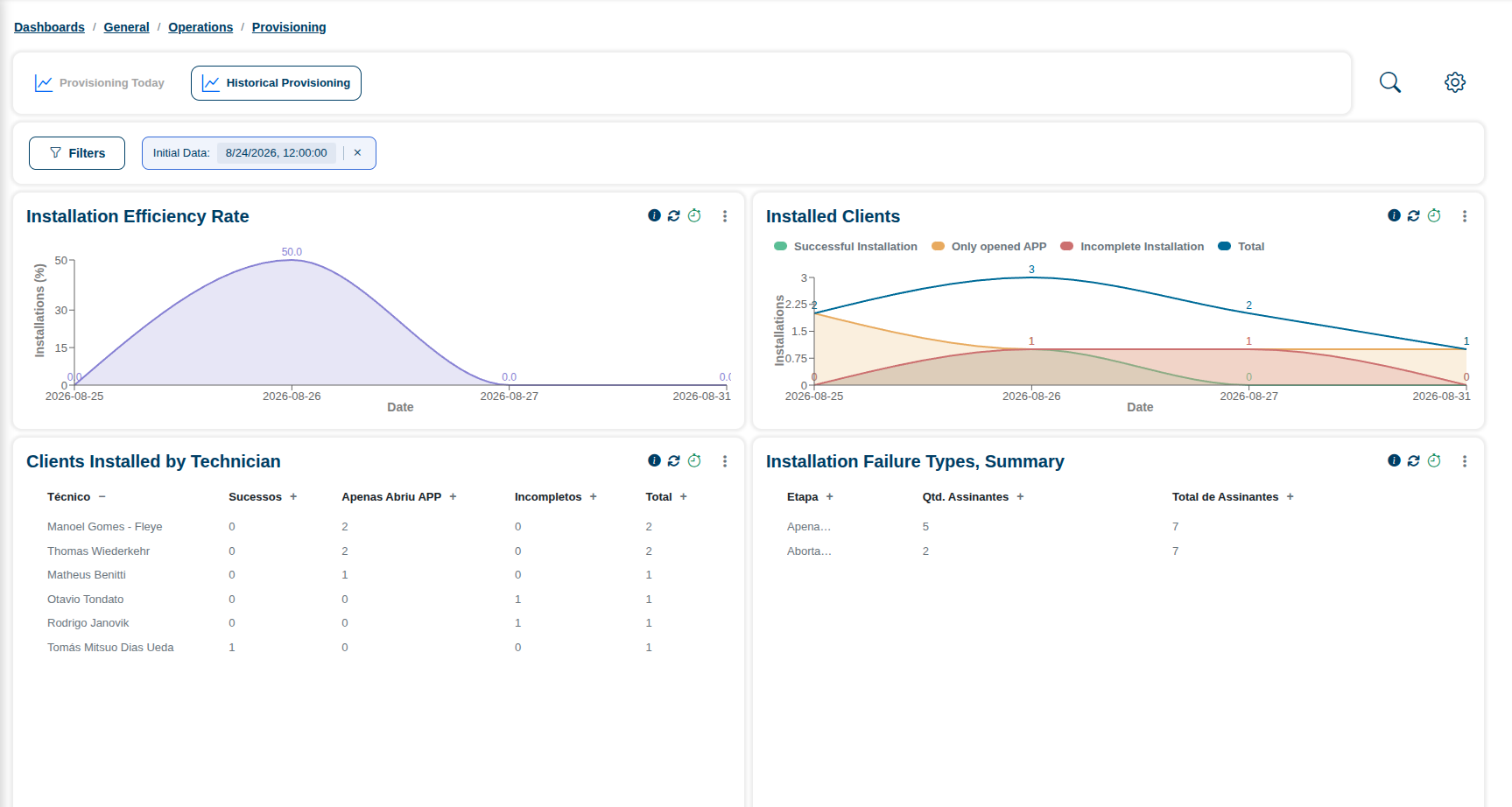
The dashboard is divided into two primary analytical graphics, below. Together, they provide a comprehensive view of our daily deployment health.

¶ 1. Installation Efficiency Rate
This graphic serves as the primary indicator showing our installation efficiency over time.
- How it is calculated: It represents the percentage of successful installations out of the total installation attempts (
Successful Installations / Total Installations). - What it measures:
- Successful installations
- Failures
- Daily performance trends and fluctuations
Diagnostic tip: A sudden drop in the efficiency rate curve usually indicates a systemic issue, such as technician having trouble in a specific step and doing the rest of the provisioning manually, an outage in the provisioning server or a bug introduced in the latest app version.
¶ 2. Installed Clients
This graphic breaks down the specific installation activity and is widely used for monitoring the daily performance of field teams. It categorizes the installation attempts into four distinct metrics:
- 🟢 Successful Installation: The installation process was fully completed without errors.
- 🟡 Only opened APP: The technician or client opened the application, but no installation sequence was initiated.
- 🔴 Incomplete Installation: The installation process was started but failed to finish.
- 🔵 Total: The absolute number of tries to install a client (the sum of all activity).
¶ Troubleshooting: Investigating Incomplete Installations
While a small number of incomplete installations can be expected due to normal field conditions (e.g., dead batteries or temporary loss of mobile signal), a high volume of Incomplete Installations (🔴) requires immediate investigation.
If you notice the red "Incomplete Installation" area growing on the Installed Clients graphic, you should:
- Cross-reference with Field Teams: Check if specific technicians or regions are experiencing hardware failures or connectivity dead zones.
¶ Detailed Troubleshooting: Historical Provisioning
To perform a more detailed troubleshooting analysis, navigate to Dashboards > General > Operations > Provisioning, and click on the Historical Provisioning tab.
Here, you will find the same Installation Efficiency Rate and Installed Clients graphics, along with additional advanced metrics to help you pinpoint exactly where and why failures are happening.
¶ 3. Clients Installed by Technician
This table displays the completed and incomplete installations grouped by the responsible technician.
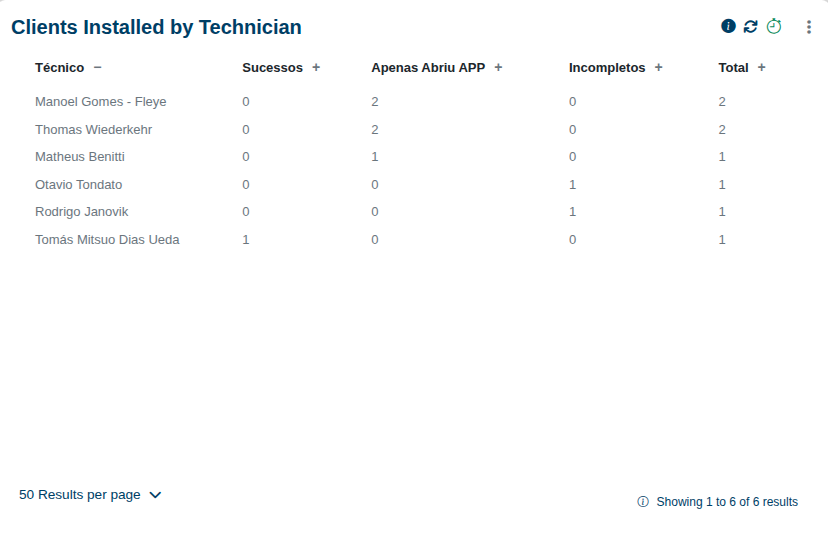
- What it measures: It allows for a direct comparison of productivity and completion rates among the team.
- Diagnostic tip: Use this to verify if an issue is a general system problem or if it is localized to specific technicians. Technicians with unusually high incomplete installation rates may need additional training, or they might be facing recurring issues with materials or access.
¶ 4. Installation Failure Types, Summary
This metric provides a summary of the most frequent failure reasons recorded during incomplete installations.
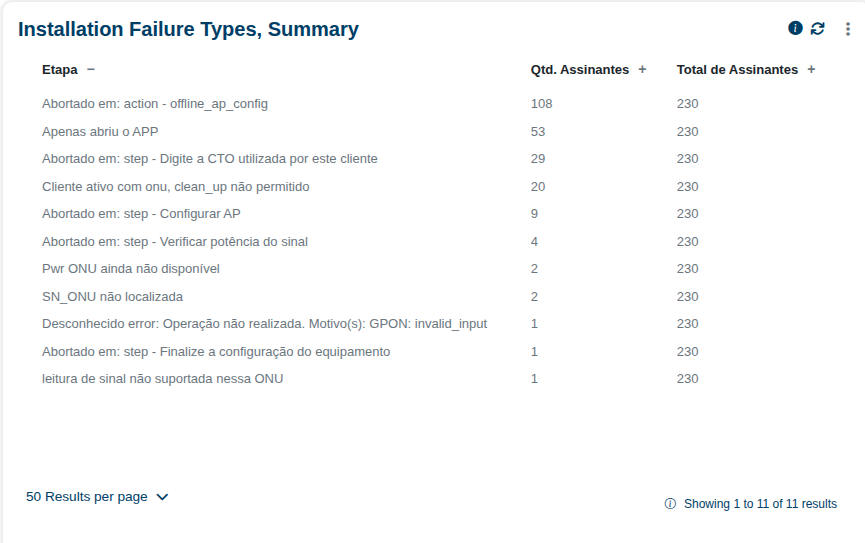
- What it measures: It highlights which specific problems and steps most affect the installation process (e.g., lack of materials, lack of access, technical problems).
- Diagnostic tip: By checking this table, you can see if we are consistently hitting the exact same error. This is incredibly useful for identifying the main workflow bottlenecks and directing immediate corrective actions.
¶ 5. Installation Failure Types, Summary (by Technician/State)
This table breaks down the failures in incomplete installations by both the responsible technician and their state, showing which failure types recur the most for each professional.
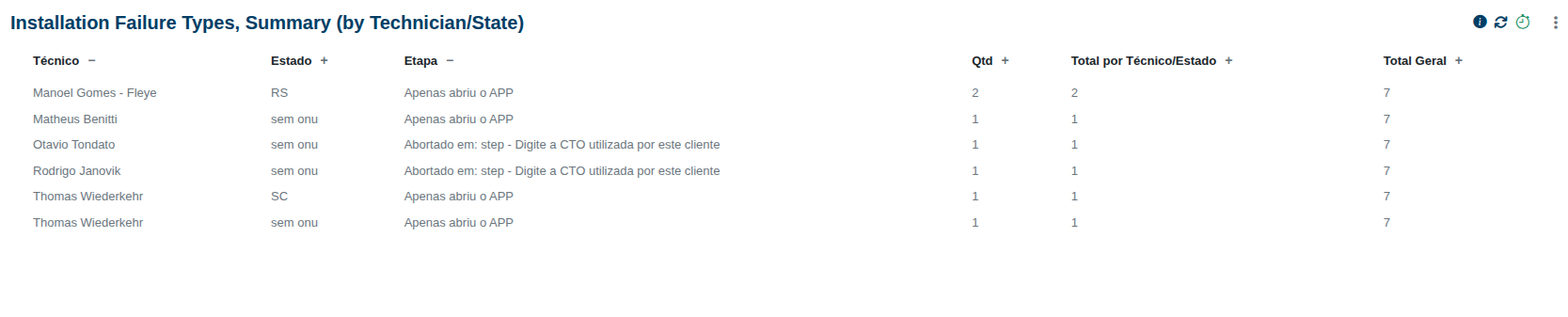
- What it measures: It allows for a granular comparison between technicians and regions, aggregating data to see if an issue is localized to a certain area.
- Diagnostic tip: Technicians with recurring failures of the same type can be easily identified here. This means you can provide targeted support for specific procedures or materials directly to the people who need it most.
For further steps on how to dive into the raw logs and diagnose these specific failures, please proceed to the Install Instructions & Diagnostic page.